

How to Hide Cables in Home Theater: 7 Methods
Table of Contents
- Why Cable Management Matters in Home Theater
- In-Wall Cable Routing: The Permanent Solution
- Cable Raceways for Home Theater: Non-Destructive Concealment
- How to Run Speaker Wire Through Walls Safely
- Best Cable Management Tools for Home Theater Setup
- Renter-Friendly Cable Concealment Methods
- Smart Home Cable Management and Acoustic Considerations
- Common Mistakes to Avoid When Hiding Home Theater Cables
- Frequently Asked Questions
Last Updated: September 19, 2026
Why Cable Management Matters in Home Theater
Learning how to hide cables in home theater prevents a messy tangle of wires from destroying the whole cinematic experience. You've invested in quality equipment, comfortable seating, and a beautiful room setup. Then you see a nest of wires behind the TV, and the magic evaporates.
Good cable management isn't just about looks. It protects your equipment, reduces interference that degrades audio quality, and makes future upgrades painless. When cables run properly, you get cleaner power delivery to your amplifiers and speakers. That means better sound. Your video cables stay shielded from interference sources. That means sharper, clearer pictures.
At JoeMo Promo, we know that how to hide cables in home theater starts with understanding your options. You have permanent solutions for dedicated media rooms and temporary approaches for renters or flexible spaces. The method you choose depends on your living situation, how much you're willing to modify your walls, and what aesthetic you're targeting.
The good news: there are seven proven methods to conceal cables effectively. Some take an afternoon. Others take a weekend. All of them work.
In-Wall Cable Routing: The Permanent Solution
Running cables inside your walls is the cleanest approach. No visible wires. No clutter. Just a sleek setup with cables hidden completely from view.
This method works best when you're installing a home theater system in a dedicated space you own. You drill holes, run cables through the wall cavity, and terminate them at wall plates. The result looks professional and permanent.
Safety and Electrical Code Compliance
Before you pick up a drill, understand the rules. Electrical code exists to prevent fires and shocks. Violating it puts your home at risk.
Low-voltage cables (speaker wire, audio visual cables, HDMI) have different requirements than electrical power lines. Speaker wire and HDMI don't carry enough current to cause fire hazard on their own. But they still need protection from physical damage.
The National Electrical Code (NEC) requires that cables running inside walls be either:
- Run through rigid conduit or tubing
- Installed in a manner that protects them from damage
- Kept away from electrical power lines by at least 12 inches
Never run speaker wire or audio visual cables alongside electrical power lines. Electrical current creates electromagnetic interference that degrades signal quality. You'll hear hum in your audio or see artifacts in your video.
Use shielded cables when running long distances inside walls. Shielding protects against interference from electrical wiring and other sources.
Tools You'll Need
Getting cables inside walls requires specific tools:
- Stud finder, locates wall framing so you drill in safe spots
- Drywall saw, cuts clean holes for wall plates and cable access
- Fish tape, a flexible metal ribbon that helps you route cables through wall cavities
- Cable sleeve, protective tubing that bundles cables and prevents snagging
- Drill with bits, for pilot holes and larger openings
- Wall plates, finished trim pieces that cover cable entry points
- Conduit and fittings, rigid protection for cables running through walls
Most homeowners can handle this work with basic tools. If you're uncomfortable cutting into walls or running cables, hire an electrician. The cost is worth the peace of mind.
Cable Raceways for Home Theater: Non-Destructive Concealment
Raceways are plastic channels that mount on your wall surface. Cables run inside the channel instead of behind the wall. No drilling. No permanent damage. Perfect for renters or anyone who wants reversible installation.
Raceways come in different sizes and finishes. Some match your wall color. Others blend with baseboards or trim. You can hide an entire audio visual cable bundle inside a single raceway that looks like a trim piece.
Surface-Mount vs. Adhesive Raceways
Surface-mount raceways use screws or brackets. They're more secure for heavy cable bundles. They work on any wall surface. They're visible but blend well with trim.
Adhesive raceways stick directly to walls. They require no drilling. They work on drywall, tile, and painted surfaces. They're less visible than surface-mount options. The downside: adhesive fails over time, especially in humid environments like bathrooms or rooms with poor ventilation.
For a home theater setup, surface-mount raceways are the better choice. They hold more cables securely. They last longer. They look intentional rather than temporary.
Paint your raceway to match your wall color. Most hardware stores sell spray paint in standard wall colors. A painted raceway becomes nearly invisible from across the room.
How to Run Speaker Wire Through Walls Safely
Speaker wire is low-voltage, but it still needs protection when running inside walls. Unprotected wire can get crushed by drywall fasteners or damaged by sharp edges as you move furniture.
Running speaker wire through walls is straightforward if you follow the right process:
- Locate the path, use a stud finder to map wall framing
- Drill access holes, create entry and exit points for your fish tape
- Thread the fish tape, feed it through the wall cavity from one hole to the other
- Attach the speaker wire, secure the wire to the fish tape hook
- Pull the wire through, carefully draw the wire into the wall
- Install wall plates, cover the holes with finished trim pieces
- Terminate the connections, connect wire to speakers and amplifier
The entire process takes 2-3 hours for a typical setup.
Low-Voltage Cable Requirements
Low-voltage cables carry audio and video signals, not electrical power. They're safe to run near electrical wiring as long as you maintain proper separation.
Keep speaker wire at least 12 inches away from electrical power lines. This distance prevents electromagnetic interference that causes hum or noise in your audio.
Use twisted-pair speaker wire when possible. The twisted design reduces interference pickup. Shielded speaker wire adds extra protection but costs more.
Using Fish Tape and Cable Sleeves
A fish tape is your best friend when routing cables through walls. This flexible metal ribbon bends around corners and obstacles inside wall cavities.
Here's the process:
- Feed the fish tape through the wall from one side
- Hook the speaker wire to the fish tape end
- Pull the fish tape back through the wall, drawing the wire with it
- Wrap the speaker wire in a cable sleeve for extra protection
Cable sleeves are plastic or foam tubes that bundle multiple cables and protect them from sharp edges and crushing. They also make future upgrades easier. When you need to add a new cable, the sleeve creates space.
Best Cable Management Tools for Home Theater Setup
The right tools make cable management faster and more professional. These aren't expensive, but they make a real difference in how your setup looks and performs.
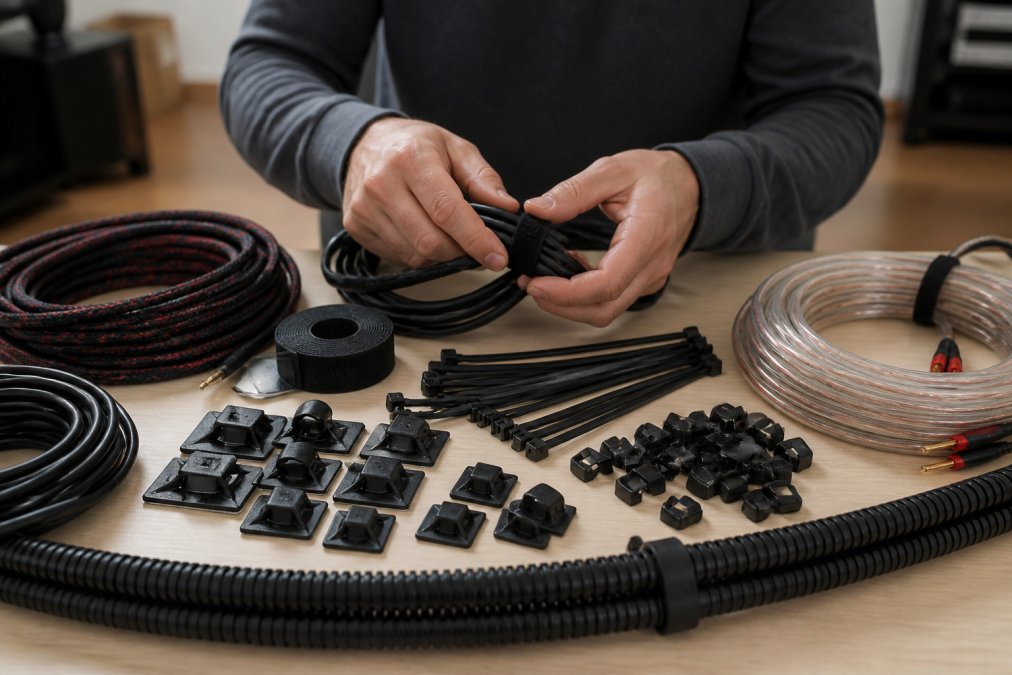
Cable Clips, Ties, and Fasteners
Cable clips hold wires in place along baseboards or furniture. They come in adhesive or screw-mount versions.
Adhesive clips work on painted drywall but fail on textured surfaces. Screw-mount clips work everywhere and last longer.
Cable ties bundle multiple wires together. Use velcro ties instead of zip ties. Velcro lets you reopen the bundle when you need to add or remove cables. Zip ties are permanent and make future changes difficult.
Label your cables with tags or markers. When you have five HDMI cables running to different devices, labels save hours of troubleshooting later.
Cable Identification and Labeling
A simple label maker solves future headaches. Spend 10 minutes labeling cables now. Save 30 minutes of confusion next month when you need to swap equipment.
Label both ends of each cable.
Renter-Friendly Cable Concealment Methods
Renters face unique constraints. You can't drill holes or modify walls permanently. But you still want a clean setup.
Using Baseboards and Existing Decor
Cables naturally hide along baseboards. Run speaker wire and audio visual cables along the base of your walls where they meet the floor. They're out of sight and protected from foot traffic.
Strategic Furniture Placement
A well-placed bookshelf or cabinet can hide an entire cable run. Position furniture to create cable channels that route wires out of view.
Smart Home Cable Management and Acoustic Considerations
Wireless audio technology has transformed home theater setup. You can now position speakers without running cables across rooms.
Shielded Cables and Interference Prevention
Interference degrades audio quality. You hear hum, buzzing, or noise. You see artifacts or lines in video.
Wireless Solutions for Clutter-Free Setup
Wireless technology keeps your home theater clean. No visible cables means a more luxurious, intentional aesthetic.
Common Mistakes to Avoid When Hiding Home Theater Cables
Learning what not to do saves time and prevents damage.
Frequently Asked Questions
Can I run speaker wire through walls safely?
Yes, but only low-voltage speaker wire rated for in-wall use. The National Electrical Code (NEC) permits speaker wire in walls if it's properly rated and doesn't share conduit with electrical power lines. Use a fish tape to guide the wire through existing cavities, and always use a cable sleeve where the wire passes through studs. Avoid running speaker wire near electrical outlets or wiring to prevent interference.
What's the easiest way to hide cables without damaging walls?
Cable raceways and adhesive-backed cord covers are the fastest non-destructive solutions. Surface-mount raceways attach to baseboards or walls with adhesive or small fasteners and require no drywall cutting. Alternatively, route cables along baseboards, behind furniture, or under area rugs. For renters, these methods let you conceal cables while keeping your security deposit safe.
What cable management tools do I need for a home theater setup?
Essential tools include cable clips and fasteners to bundle wires, shielded cables to reduce electromagnetic interference, cable ties for organization, and a stud finder if you're routing wires through walls. Cable sleeves protect wires where they pass through tight spaces, and labels help identify each cable. If going in-wall, add a fish tape, drywall saw, and wire strippers to your toolkit.
How do I prevent audio interference from hidden cables?
Use shielded audio and video cables, especially for long runs. Keep speaker wire and power cables separated, never bundle them together. If in-wall routing is necessary, maintain at least 12 inches of distance between audio cables and electrical wiring. Route low-voltage cables in separate conduit from power lines. Proper cable identification and separation during installation prevents costly acoustic problems later.






















