

Best Wireless Home Theater Sound Systems for 2026
Table of Contents
- Quick Comparison: Best Wireless Home Theater Sound Systems
- 1. iLive 5.1 Surround Sound System: Best Overall
- 2. Yamaha YHT-4950U: Best for Audio Fidelity
- 3. JoeMo 800W Surround Sound System: Best Budget Pick
- 4. Supersonic Bold 5.1: Best for Deep Bass
- 5. iLive Cinema Series 5.1: Best for Large Rooms
- What to Look for in a Wireless Home Theater System
- Wireless Surround Sound System Setup: What to Expect
- Frequently Asked Questions
Last Updated: September 14, 2026
Quick Comparison: Best Wireless Home Theater Sound Systems
Shopping for the best wireless home theater sound systems means weighing channel count, subwoofer output, and TV connectivity. This guide from JoeMo Promo ranks five systems we carry, from a $198 budget setup to a $618 Yamaha package.
A wireless home theater delivers surround channels without running speaker cable to your rear speakers. The front three channels and subwoofer still need power, but the signal travels wirelessly.
Here's the at-a-glance breakdown.
| System | Price | Channels | Best For | Standout Trait |
|---|---|---|---|---|
| iLive 5.1 Surround Sound System | $519.99 | 5.1 | Most rooms | Plug-and-play, no receiver |
| Yamaha YHT-4950U | $618.80 | 5.1 | Audio fidelity | 400W total output |
| JoeMo 800W Surround Sound System | $198.24 | 5.1/2.1 | Budget buyers | 6.5" subwoofer, EQ modes |
| Supersonic Bold 5.1 | $519.99 | 5.1 | Deep bass | Heavyweight cabinet build |
| iLive Cinema Series 5.1 | $499.99 | 5.1 | Large rooms | 26" center speaker |
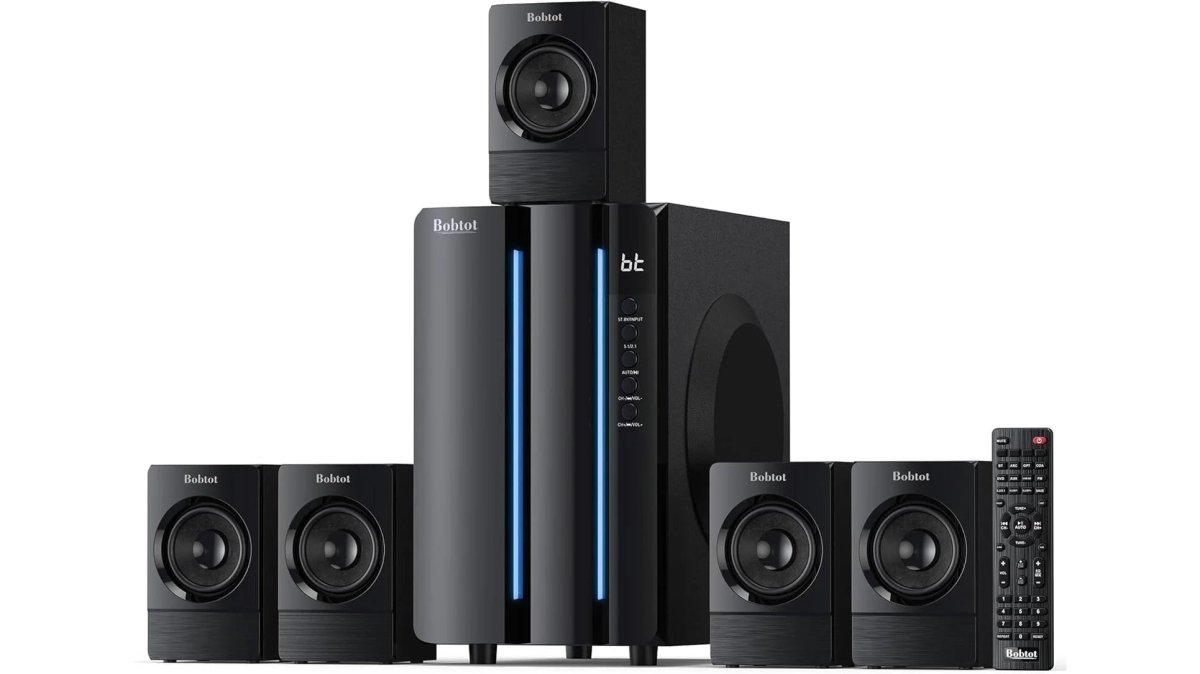
1. iLive 5.1 Surround Sound System: Best Overall
The iLive 5.1 Surround Sound System is our top pick because it removes the two things that stall most home theater builds: a separate receiver and a pile of speaker wire. It pairs over Bluetooth with your TV, phone, or streaming box, and dialogue stays crisp while low-frequency effects move air. Setup is plug-and-play: place the satellites, power them, and pair.


2. Yamaha YHT-4950U: Best for Audio Fidelity
Yamaha's YHT-4950U is the pick when sound quality outranks convenience, pushing 400W across 5.1 channels with tonal balance reflecting decades of receiver engineering.
Where it falls short: this is a traditional receiver-based system, so expect longer setup and more cabling than the iLive.
Coming from a soundbar, expect wider channel separation and dialogue anchored in the center speaker, not smeared across a single bar.
3. JoeMo 800W Surround Sound System: Best Budget Pick
Real subwoofer punch for under $200 is rare, and the JoeMo 800W Surround Sound System delivers it. The 6.5" subwoofer handles the low end, and the system runs as 5.1 or 2.1 depending on satellite placement.
The full-function remote and built-in EQ modes are details most budget systems skip, letting you tune the sound to a carpeted living room or hard-floored bonus room.
The honest limitation: at this price, the cabinet finish and binding posts are basic. But it pairs in seconds over Bluetooth, and for a first surround system or game-day setup, that trade-off is easy to accept.
4. Supersonic Bold 5.1: Best for Deep Bass
Action movies and sports are the Supersonic Bold 5.1's home turf. The cabinet mass shows up in the sound: bass hits with weight instead of a thin thump, and surround presence fills the room.

The trade-off is physical: heavy speakers need stable placement, and the subwoofer belongs on a solid floor, not a floating shelf. Plan the layout before it arrives.
5. iLive Cinema Series 5.1: Best for Large Rooms
The iLive Cinema Series 5.1 anchors its sound with a full-size 26" center speaker, which keeps dialogue intelligible when seating is far from the screen. Four satellites handle the surround channels.
Large rooms expose weak center channels fast, dialogue turns to mush as the listening position moves back. The oversized center is the fix, which is why this system suits open-plan living rooms and converted basements.
Bluetooth streaming keeps cable clutter down, so the room stays a living space rather than a wiring project.
What to Look for in a Wireless Home Theater System
Three specifications decide long-term satisfaction: channel configuration, connectivity, and subwoofer quality. But two specs almost no buying guide mentions, latency and firmware handling, determine whether you still like the system in year three.
Channel Configurations and Spatial Audio
Channel configuration describes how many speakers and subwoofers a system drives, written as 5.1 or 7.1. The first number counts main speakers, the second counts subwoofers.
A 5.1 layout gives you left, center, right, and two surround channels, enough for the vast majority of living rooms. Dolby Atmos and other spatial formats add height channels for overhead effects, often simulated through virtualization rather than ceiling speakers.
Virtualization processes audio to place effects above and around you using speakers you already own. It works, but it's an approximation. A 5.1.2 Atmos layout uses two actual upward-firing or ceiling-mounted speakers; a virtualized 5.1 system fakes the effect with processing (Dolby Atmos Speaker Setup 101). If your ceiling is low or seating is close to the TV, virtualization often sounds better than real height speakers because the geometry is too tight for discrete channels to separate.
Connectivity and Smart Integration
Bluetooth is the baseline, and it's what most systems here use to pair with a TV, phone, or streaming box. Wi-Fi streaming adds multi-room audio and higher-bandwidth formats, but also a network dependency.
HDMI eARC carries uncompressed audio over a single cable and lets the TV remote control volume (HDMI ARC). If your TV is older, optical or Bluetooth works with some format limitations.
For most buyers, Bluetooth plus a stable HDMI or optical connection covers movies, streaming apps, and phone music.
Latency: The Spec Nobody Prints on the Box
Wireless audio introduces a delay between when the TV sends a sound and when the speaker plays it. That delay is called latency, and it's measured in milliseconds. Bluetooth audio commonly runs 100-200 ms; Wi-Fi-based systems and proprietary wireless links often run lower, but the number varies by codec and processing (Improving latency and broadening audio horizons with Bluetooth LE Audio).
Why it matters: at 100 ms, a lip-sync error is visible on dialogue; at 200 ms, it's distracting. Most TVs include an audio delay or lip-sync adjustment in the sound menu, usually under Settings > Sound > Audio Delay or Digital Audio Out Delay, that lets you push the video back to match the audio. Before you return a system for "lag," check that setting: often the system is fine and the TV's default delay is wrong for the source.
If your TV has no lip-sync control, an HDMI eARC connection usually fixes the problem because the TV and the system negotiate timing over the same cable. Bluetooth is the fallback, not the first choice, when sync matters.
Firmware Support and Long-Term Obsolescence
A wireless home theater system is a small computer: a wireless chipset, a DSP for surround processing, and firmware that ties them together. That firmware determines which audio codecs the system can decode, which streaming formats it can accept, and whether it stays compatible with your TV after a TV software update. Before you buy, check three things: whether the manufacturer publishes firmware updates on a public support page, how recent the last update was, and whether the system supports over-the-air updates or requires a USB drive. A system whose last firmware update is two or more years old has effectively been abandoned. It will still play audio, but it may not gain support for newer codecs and may fall out of sync with TVs that change their audio handshake. This is the single biggest difference between a system that lasts five years and one that lasts eighteen months, and it's worth a five-minute check on the manufacturer's support site before you commit.
Wireless Surround Sound System Setup: What to Expect
Wireless surround sound system setup typically takes 20 to 45 minutes and requires no tools beyond what you'd use to place furniture. The rear speakers still need power, so plan for two outlets or a pair of extension cords.
Here's the sequence that avoids rework:
- Place the front three speakers and subwoofer first, then sit in your main seat and confirm dialogue is clear
- Position the rear speakers slightly behind and to the sides of the seating area, angled toward the listener
- Power everything and pair the system to your TV over Bluetooth or HDMI
- Run any built-in calibration or EQ mode for your room type
- Test with a dialogue-heavy scene, then an action scene, and adjust the subwoofer level last
Wireless vs wired home theater systems comes down to one trade-off. Wired systems deliver a fixed, interference-free signal and never drop out. Wireless systems trade that certainty for a room with no cable runs under the rug. For most homes, the trade is worth it.
Two issues worth knowing before you buy. First, latency: if audio lags the picture, check your TV's audio delay or lip-sync setting before blaming the speakers. Second, signal interference: Bluetooth and Wi-Fi share spectrum, so a router sitting directly beside the receiver can cause dropouts. Moving one of them a few feet usually solves it.
Power and Electrical Constraints: The Part "Wireless" Doesn't Cover
Wireless refers to the signal, not the electricity. Every satellite, the subwoofer, and the receiver or control unit still needs a wall outlet or power strip. A 5.1 system with a powered subwoofer and two wireless rear speakers can occupy four outlets; add a streaming stick and a TV and you're at six on the same circuit.
That matters because a standard 15-amp household circuit in the U.S. supplies roughly 1,800 watts total, and the National Electrical Code recommends keeping a single circuit loaded to no more than 80 percent of its rating for continuous use, about 1,440 watts. A subwoofer alone can draw 150-400 watts at peak. Add a receiver, a TV, and a game console, and a shared circuit in an older home can trip the breaker the moment everything powers on at once.
The fix is simple and cheap. Put the subwoofer on a different circuit than the TV and receiver if you can, a different wall on the other side of the room is often a different circuit. Use a surge protector with a built-in current limiter rather than a plain power strip. And if you're running rear-speaker power to a wall behind the couch, use a flat extension cord rated for the load and tuck it under a rug or along the baseboard rather than daisy-chaining two cords together.
For a truly clean look, the rear-speaker power run is the one cable you can't eliminate. Plan it before you place furniture, not after.
Calibrating for Non-Rectangular Rooms
Most setup guides assume a rectangular room with the TV on one short wall and the couch centered on the other. Real living rooms have an open kitchen, a hallway, a vaulted ceiling, or a fireplace that forces the TV off-center. Those shapes change how sound behaves, and the standard "place the speakers in a circle around the listener" advice doesn't survive contact with them.
Three adjustments handle most irregular rooms:
Asymmetrical side walls. If one side of the room is open to a kitchen and the other is a solid wall, the solid-wall side reflects more sound and the open side absorbs it. Aim the speaker on the open side slightly toward the listener and the wall-side speaker slightly away, or reduce the wall-side surround channel by 1-2 dB if your system allows per-channel trim.
Off-center seating. If the couch sits to one side of the TV, the center speaker is no longer equidistant from both ears. Point the center speaker at the main listening position rather than straight ahead, and if your system has a per-channel distance or delay setting, enter the actual measured distance from each speaker to the main seat. That setting keeps dialogue anchored to the screen when the geometry is wrong.
Vaulted or angled ceilings. Height effects from virtualization rely on reflections off a flat ceiling. A vaulted ceiling scatters those reflections, so Atmos-style height cues get weaker. Either accept a flatter soundstage or add a pair of upward-firing modules on top of the front speakers and aim them at the flat portion of the ceiling if one exists.
A tape measure and the calibration menu do more for an irregular room than any upgrade. Measure the distance from each speaker to the main seat, enter those numbers, and re-run the test scene, the improvement is usually obvious on the first dialogue-heavy scene.
Frequently Asked Questions
Are wireless home theater systems actually worth it?
Yes, for most rooms. Wireless systems cut cable clutter and setup time, and modern Bluetooth and Wi-Fi streaming deliver clean, high-fidelity audio. You still get real surround sound with separate rear speakers, but without running wires across the floor. If you want a dedicated cinema feel without permanent installation, a wireless home theater system is a practical upgrade.
Do wireless surround sound systems still require power cables?
Yes. Wireless refers to the audio signal, not power. Each speaker still needs a power outlet, so plan for outlets near your rear and side speaker positions. Some systems use a wireless transmitter for the rear channels, but the speakers themselves plug into the wall. Battery-powered portable speakers exist, but they are not typical for dedicated home theater setups.
What is the difference between a soundbar system and a discrete wireless speaker system?
A soundbar with wireless rear speakers uses a single front bar for left, center, and right channels, plus wireless rear speakers for surround. A discrete system uses separate speakers for each channel, which usually gives better separation and a wider soundstage. Discrete systems take more space but deliver more immersive audio for larger rooms.
How do I choose the best wireless sound system for a large room?
For large rooms, look for higher total power, a dedicated subwoofer, and speakers with wide frequency response. A 5.1 system with a 26-inch center speaker and four satellites, like the iLive Cinema Series, can fill bigger spaces. Also check connectivity options like HDMI eARC and Wi-Fi streaming to ensure strong, lag-free transmission across the room.
Do wireless home theater systems suffer from audio lag?
Audio lag can happen, but it is rare with modern systems. Bluetooth can introduce latency, so many systems use dedicated wireless transmitters or Wi-Fi streaming to keep audio and video in sync. If you notice lag, check your TV's audio delay settings or use a wired HDMI connection from your source to the sound system to eliminate the issue.






















