

How to Design a Small Home Theater Layout
Table of Contents
- Step 1: Choose the Right Room and Measure Your Space
- Step 2: Determine Screen Size and Viewing Distance for Your Small Home Theater Layout
- Step 3: Plan Home Theater Seating for Small Spaces
- Step 4: Position Your Projector or TV
- Step 5: Set Up Small Room Surround Sound Speaker Placement
- Step 6: Design Small Home Theater Lighting Ideas
- Step 7: Handle Acoustics, Ventilation, and Cable Management
- Common Mistakes to Avoid
- Frequently Asked Questions
Last Updated: October 21, 2026
Step 1: Choose the Right Room and Measure Your Space
A small home theater layout starts with picking the right room. A dedicated media room beats a multipurpose living area because you can control light, sound, and traffic without compromise.

Measure the length, width, and ceiling height in feet. A small home theater layout requires precision, since even a few feet changes where you can place your screen and seating. Most home theaters need at least 10 feet of depth, though 12 to 15 feet is better.
Rectangular rooms are ideal for a small home theater layout because they naturally direct sound and sight lines toward the screen. Oddly shaped rooms with alcoves or angled ceilings create dead zones and make speaker placement harder.
Check for windows. Even small ones leak light that washes out your image, especially with a projector, so plan for heavy curtains or shades that fully block natural light.
Finally, consider ventilation. Projectors and audio equipment generate warmth, and a sealed room gets uncomfortable fast. Ensure adequate airflow or plan for a ceiling fan that won't interfere with your projector.
Step 2: Determine Screen Size and Viewing Distance for Your Small Home Theater Layout
Getting screen size right is critical for a small home theater layout. Too small and you'll squint; too large and you'll turn your head constantly.
Use this simple rule: multiply your viewing distance by 1.5 to find your ideal screen width in inches. If you sit 10 feet from the screen, aim for a 60-inch display (10 feet × 12 inches per foot = 120 inches ÷ 2 = 60 inches). If your seating is 12 feet back, a 72-inch screen works well.
For a small home theater layout with tight space, a projector often makes more sense than a TV, creating a 100-inch to 300-inch image from the same distance that limits a TV to 75 inches.
If you choose a TV instead, wall-mount it at eye level when seated. Most people mount TVs too high. For a 55-inch TV, mount the center about 42 inches from the floor; for a 65-inch, aim for 48 inches.
Viewing angle matters too. Sit in your planned seating spot and look straight ahead; that's where your screen center should be. Beyond 30 degrees off-center, viewers see color shift and reduced contrast.
Step 3: Plan Home Theater Seating for Small Spaces
Seating is where comfort meets constraint in a small home theater layout. Choose quality over quantity.
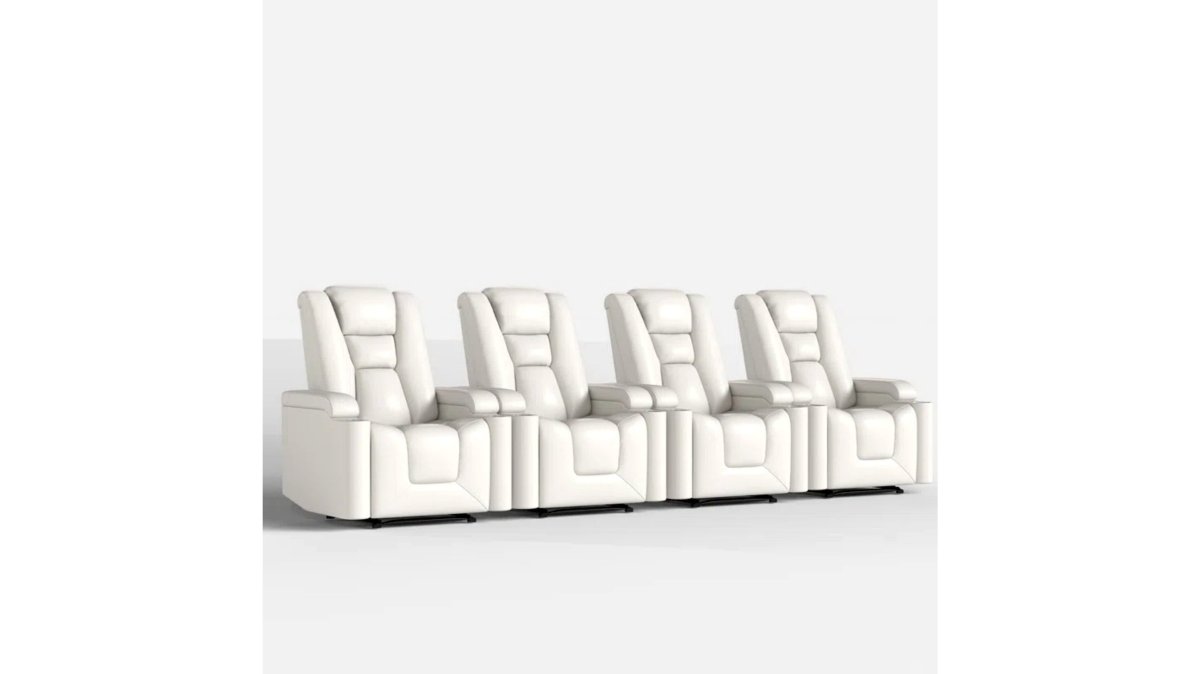
Start with one premium recliner positioned dead center facing the screen. The Ridgeline Single Power Theater Recliner from JoeMo Promo combines faux leather durability with power recline and built-in cup holders, creating an intentional, luxe feel instead of cramped.

If you have room for two seats, position them side by side with a small gap, aiming for 3 to 4 feet of width per seat. Avoid staggered rows, which look awkward and waste space.
Measure clearance: you need at least 3 feet from the back of the recliner to the wall behind it when fully reclined, or it won't open properly.
The Ridgeline Power Recliner with USB & Storage Arm from JoeMo Promo adds a USB charging port and dual cup holders plus storage arm, eliminating side tables. In a small home theater layout, every inch counts, so multifunctional furniture pays off.
Elevate seating slightly off the floor if possible. A 6- to 12-inch platform or riser improves sight lines and keeps your eye level in the sweet spot for a ceiling-mounted projector.
Step 4: Position Your Projector or TV
Where you place your display makes or breaks your small home theater layout.
For a TV, mount it at eye level when seated, with the screen center aligned with your eyes.
For a projector, you have more flexibility. The Nova 300 from JoeMo Promo features a 360° rotating stand that points at walls, ceilings, or even outdoor surfaces, solving the biggest problem in small rooms: finding a spot that doesn't block the view or create glare.
Mount your projector 8 to 12 feet from the screen for a 100- to 150-inch image, and check your model's throw ratio. The Nova 300's auto-focus and keystone correction handle imperfect angles automatically, so minor mounting compromises don't hurt image quality.
Avoid placing a projector where it casts a shadow on the screen. In a small home theater layout, position it high (ceiling-mounted) or far to the side so nobody walks through the beam.
Route all cables behind walls or inside conduit; visible cables make a room feel cluttered. For wireless audio, the iLive 5.1 Surround Sound System from JoeMo Promo connects via Bluetooth, so you skip the cable mess entirely.

Step 5: Set Up Small Room Surround Sound Speaker Placement
Audio makes or breaks the immersive experience, and a small home theater layout needs strategic speaker placement because you can't spread speakers far apart.
Start with a center channel speaker mounted above or below your TV or projection screen.
Place left and right front speakers at 22 to 30 degrees from center with a gentle 10-degree toe-in. In a small home theater layout, these speakers sit closer than in large rooms, so less angle is needed.
Mount surround speakers 1 to 2 feet above ear level on the side or rear walls. They create ambient and directional effects, not primary dialogue, so they should blend in.
A subwoofer handles bass below 80 Hz. Place it in a corner or along the front wall where bass naturally builds up, not in the middle of the room where it sounds boomy.
The iLive 5.1 Surround Sound System from JoeMo Promo includes all five speakers plus a subwoofer, and Bluetooth connectivity means no tangled receiver cables. For a small home theater layout, this all-in-one approach beats cobbling together separate components.
| Speaker Type | Placement | Height | Purpose |
|---|---|---|---|
| Center Channel | Above/below screen | Ear level when seated | Dialogue and center effects |
| Left/Right Front | 22-30° from center | Ear level | Main stereo image |
| Surrounds | Side or rear walls | 1-2 feet above ear | Ambient and directional sound |
| Subwoofer | Corner or front wall | Floor level | Bass below 80 Hz |
Step 6: Design Small Home Theater Lighting Ideas
Lighting shapes the mood and function of your small home theater layout. Bad lighting ruins a good setup; good lighting makes everything feel premium.
Start with complete darkness for movie watching. Install blackout curtains or cellular shades that block all light leaks, since even small gaps around window frames wash out projector images. With a TV, darkness isn't as critical but still improves contrast and color.
Nova 300 Smart Home Theater Projector →
Add task lighting for navigation: low-level LED strips along the floor or baseboards so people can move safely without tripping. Use warm white (2700K) or amber LEDs; bright white or blue light ruins night vision.
Include accent lighting for ambiance: wall-mounted sconces or LED strips behind the screen add visual interest without glare. Dimmable fixtures let you adjust the mood, and in a small home theater layout, subtle lighting feels sophisticated.
Avoid direct light on the screen. Any light source behind the seating area bounces off the screen and creates glare. Position lighting to the sides or behind the seating, never in front.
Consider smart bulbs that sync with your content and dim automatically when a movie starts, eliminating manual adjustment before every viewing.
Step 7: Handle Acoustics, Ventilation, and Cable Management
Three often-overlooked details make or break your small home theater layout.
Acoustics and Sound Control
Hard surfaces (drywall, tile, glass) bounce sound around and create echo. Soft materials (curtains, carpet, upholstered furniture) absorb sound and reduce reflections.
Hang heavy curtains to absorb mid and high frequencies, add carpet or thick rugs to reduce bass boom, and let upholstered seating absorb sound naturally.
Avoid hard, parallel walls if possible; sound bounces between them and creates flutter echo. Break them up with curtains or furniture placement.
Ventilation
Projectors and audio equipment generate heat. In a sealed small home theater layout, temperatures can climb fast.
If you're ceiling-mounting a projector, leave at least 12 inches of clearance above it for heat dissipation; overheating shortens projector life dramatically.
Cable Management
Route cables behind walls, under carpet, or inside conduit, and label both ends so you can trace them later. Visible cables make a small room feel chaotic.
Use wireless audio when possible. The iLive 5.1 system connects via Bluetooth, eliminating speaker cables and keeping your small home theater layout clean and future-proof.
For multiple devices (projector, receiver, streaming box, gaming console), a small equipment rack organizes everything and simplifies cable routing.
Common Mistakes to Avoid
Building a small home theater layout tempts you into common errors.
Mistake 1: Choosing the wrong room. Low ceilings, a room next to the kitchen, or lots of windows create problems you can't fix later.
Mistake 2: Seating too close to the screen. Sit 8 feet from a 65-inch TV and you'll see individual pixels.
Mistake 3: Mounting the TV too high. Your eyes should aim at the screen center, not up at it.
Mistake 4: Skipping acoustic treatment. Hard walls bounce sound and create echo.
Mistake 5: Ignoring cable management. Visible cables make even expensive equipment look cheap. Hide cables behind walls or in conduit.
Mistake 6: Overcrowding the space. A small home theater layout works best with one or two premium seats, not three cramped ones.
Mistake 7: Forgetting about heat and ventilation. Projectors run hot. Sealed rooms trap heat and shorten equipment life. Ensure adequate airflow.
Mistake 8: Choosing budget equipment. A cheap projector or TV shows artifacts and colors that shift with viewing angle.
Creating a small home theater layout requires thoughtful planning, but the payoff is enormous.
Frequently Asked Questions
Can you set up a home theater in a small living room?
Yes. A small home theater layout works in rooms as tight as 12 feet deep. The key is choosing the right screen size for your viewing distance, a 100 to 120-inch projection works well in compact spaces. Position seating 1.5 times the screen width away for comfort. Use a projector with a 360° stand like the Nova 300 Smart Home Theater Projector to project onto a wall or ceiling without permanent installation. Wireless audio keeps cables out of sight, and one or two recliners fit where a traditional couch would.
How far should seating be from a screen in a small home theater?
Sit 1.5 to 2.5 times the screen width away for optimal viewing. For a 100-inch screen, that's roughly 12.5 to 21 feet; for 120 inches, 15 to 25 feet. In very tight rooms, prioritize comfort over the textbook range, sitting closer is better than standing or craning your neck. Measure your room depth first, then work backward to choose your screen size and seat position.
Where should speakers go in a small home theater?
In small rooms, mount surround speakers 1 to 2 feet above ear level on side walls, angled slightly toward the seating area. Place the center channel speaker directly above or below your screen for clear dialogue. Position the subwoofer in a corner or along a wall to reduce bass dead spots. A 5.1 system like the iLive 5.1 Surround Sound System works well in compact spaces because it uses wireless Bluetooth connectivity, eliminating the cable clutter that makes small rooms feel cramped.
What room dimensions work best for a small home theater?
A rectangular room 12 to 16 feet deep and 10 to 14 feet wide is ideal for small home theater layouts. Avoid very narrow rooms (under 8 feet wide) where surround speakers can't be positioned effectively. High ceilings (at least 8 feet) give you flexibility for projector mounting and overhead speaker placement. Rooms with fewer windows and fewer reflective surfaces (hard flooring, tile) are easier to control acoustically and require less sound treatment.






















