

Ergonomic Home Theater Seating Guide
Table of Contents
- Why Ergonomic Home Theater Seating Matters
- Understanding Home Theater Seating Dimensions
- Designing Your Home Theater Seating Layout
- Home Theater Viewing Distance and Sightlines
- Best Home Theater Recliners for Comfort and Support
- Ergonomic Seating for Accessibility and Inclusive Planning
- Installation, Delivery, and Maintenance
- Frequently Asked Questions
Last Updated: October 19, 2026
Why Ergonomic Home Theater Seating Matters
An ergonomic home theater seating guide isn't just about comfort, it's about protecting your body during the hours you'll spend watching movies, shows, and games.
The difference between poor and ergonomic seating becomes obvious fast. Slouching in an unsupported chair forces your spine into unnatural curves, your neck juts forward, and your lower back rounds.
Designing your home theater with ergonomics in mind means measuring twice and choosing seating that actually supports your body.
Understanding Home Theater Seating Dimensions
Home theater seating dimensions are the foundation of everything else. Get these wrong, and no amount of cushioning will save you. Seat width, height, and depth each affect how your body sits and how long you stay comfortable.
Seat Width, Height, and Depth
Seat width determines whether you fit comfortably without feeling squeezed. Most people need 30-36 inches of cushion width to avoid hip pressure.
Seat height matters more than people realize. The American Society of Interior Designers ergonomic standards recommend this range for sustained sitting comfort.
Seat depth is the distance from the front of the cushion to the backrest. A depth of 20-24 inches works for most people.
Row Spacing and Seat Pitch
Row spacing is the distance from the back of one seat to the back of the next row behind it. Minimum spacing is 36 inches for standard seating.
Seat pitch (also called riser height) is how much higher each row sits than the one in front. A pitch of 12-18 inches lets back-row viewers see over the heads in front.
Designing Your Home Theater Seating Layout
Your room's dimensions dictate what's possible. Before you buy a single seat, measure your space and create a scaled floor plan.
Room Dimensions and Floor Plan Measurement
Start with the basics: measure the length, width, and height of your room and write everything down.
Next, mark where your screen will go. Most home theaters place the screen on the front wall, centered horizontally. Measure from the floor to where the screen's center will be, typically 48-60 inches high.
Now sketch your seating positions on graph paper or a digital floor planner. Each seat occupies roughly 36 inches wide and 24-30 inches deep.
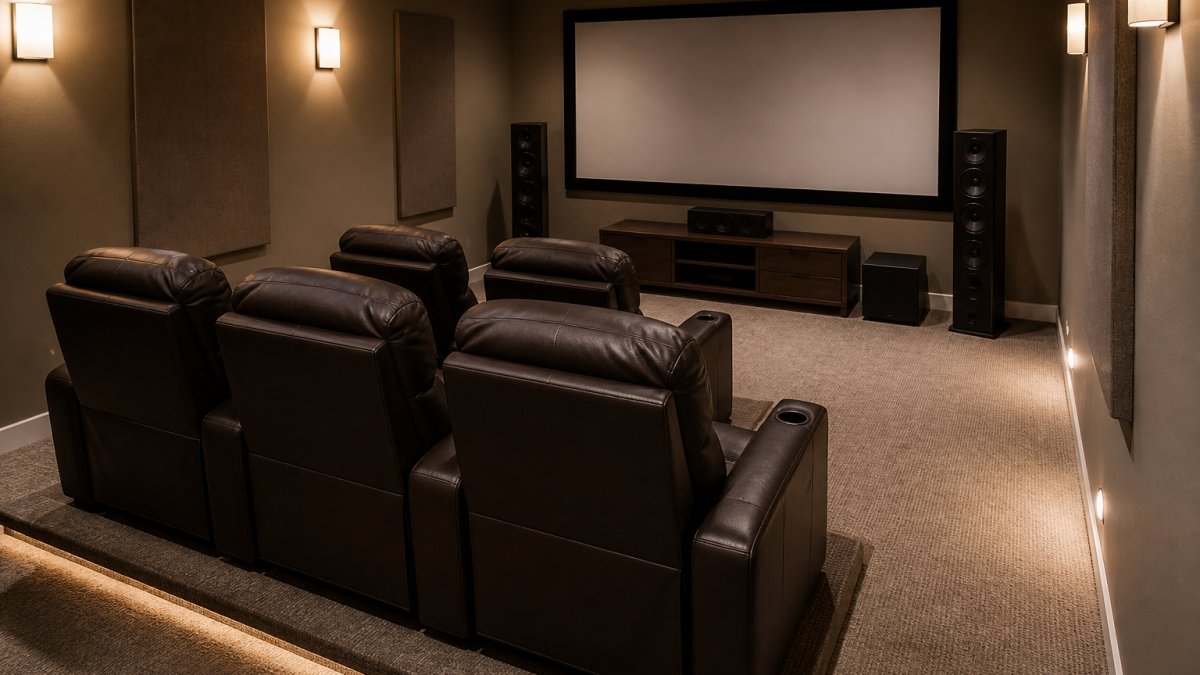
Seating Configuration Options
You have three main layout patterns: single row, stadium style (tiered rows), and sectional/sofa arrangements.
Single row is the simplest: all seats face the screen at the same height and distance.
Stadium style (tiered rows) gives you more seats without blocking views. The back row sits higher, so viewers see over the heads in front.
Sectional and sofa arrangements combine individual recliners with multi-seat sofas.
JoeMo Promo offers configurations ranging from single power recliners like the Ridgeline Single Power Theater Recliner at $1,519.99 to multi-seat sets like the Ridgeline 5-Seat Power Theater Recliner Set at $1,939.99.

Walkway Clearance and Circulation
People need to move through your theater without vaulting over seats. Plan walkways on both sides of your seating area and behind the back row: side aisles at least 24 inches wide, and a back walkway of 30-36 inches so two people can pass comfortably.
If your room lacks natural side walls, use the edges of your seating area to define the aisles and mark them on your floor plan so you don't place a seat there. This matters most in basements or converted rooms where the layout isn't obvious.
Home Theater Viewing Distance and Sightlines
Where you sit relative to the screen determines whether you enjoy the movie or strain your eyes and neck.
Calculating Optimal Viewing Distance
The ideal viewing distance depends on screen size and resolution.
Example: A 100-inch screen is roughly 87 inches wide. At 1.2x magnification, your optimal viewing distance is about 104 inches (8.7 feet) from the screen. Sit closer and you'll see individual pixels.
The Society of Motion Picture and Television Engineers viewing distance standards provide technical guidance for professional installations. Home theaters typically follow these same principles for comfort and image quality.
Viewing Angles and Clear Sightlines
Your viewing angle, how far left or right you sit from the screen's center, affects image quality and comfort. Sit within 30 degrees of center; beyond that, colors shift and contrast degrades, especially on LCD and LED displays.
Ridgeline Single Power Theater Recliner →
Clear sightlines mean every seat sees the entire screen without obstruction. Walk your planned seating area and check for support columns, doorways, windows, or furniture blocking the view. If a post can't be avoided, position seats so it doesn't block the screen center.
Best Home Theater Recliners for Comfort and Support
Not all recliners are created equal. Theater-grade recliners differ from living room recliners in how they support your body during extended sitting and how they integrate into a theater layout.
Power Recline and Adjustability Features
Power recline lets you adjust your position with a button instead of manual effort. You'll adjust multiple times during a movie, and manual recliners require leg-pushing that's tiring and disturbs others. Power recline is quieter, easier, and lets you find your perfect angle without fuss.
Look for recliners with multiple recline positions (ideally infinite or at least 5+ preset positions). The Haiylee Zero Gravity Theater Sofa at $2,474.54 includes power headrest and footrest for full-body adjustment.

Lumbar Support, Headrest, and Back Support
Lumbar support is a firm section in the lower back area that prevents your spine from rounding forward.
Headrest support keeps your neck in a neutral position. Your head should rest against the headrest without your chin dropping to your chest or your head tilting back.
Back support should extend from your lower back to your shoulders, cradling your entire spine. Seats with insufficient back height leave your mid-back unsupported and cause fatigue during long sessions.
Ergonomic Seating for Accessibility and Inclusive Planning
Not everyone's body fits the standard dimensions. Good theater design accommodates different body sizes, mobility needs, and preferences.
Accommodating Different Body Sizes and Mobility Needs
Wider seats (38-42 inches) accommodate people with larger frames or mobility challenges, and seat height should suit each person's legs and mobility. Recliners with power assist help people with limited strength or arthritis stand up after sitting.
Consider aisle width and walkway space if anyone uses a cane, walker, or wheelchair. A 30-inch aisle is tight for a wheelchair. Plan for 36-42 inches if accessibility is a priority.
Family and Shared-Use Considerations
If your theater serves children and adults, plan for different seat heights and widths. A child's seat might be 28 inches wide and 14 inches high, while adult seats are 32-36 inches wide and 16-18 inches high. Some families mix individual recliners for adults with a smaller loveseat or sofa for kids.
Theater seating from JoeMo Promo, like the Ridgeline 4-Seat Power Recliner Set at $1,369.99, lets each person have their own power recline, so kids and adults can adjust independently.

Installation, Delivery, and Maintenance
Getting your seating into your theater and keeping it in good condition matters as much as choosing the right seats.
JoeMo Promo includes free shipping on most orders within the Continental U.S. Power recliners need an electrical outlet within reach of each seat, so plan outlet placement before delivery.
Maintenance is straightforward. Faux and vegan leather (used on many JoeMo Promo recliners) wipe clean with a damp cloth. Check power mechanisms annually, and use the 30-day return policy to test your seating.
Creating an ergonomic home theater means measuring your space, choosing seating that supports your body, and arranging everything so you can actually relax during a movie. JoeMo Promo's theater recliners combine power recline, genuine back support, and flexible configurations so your media room becomes the place you want to spend your evenings.
| Measurement | Standard Range | Why It Matters |
|---|---|---|
| Seat Width | 30-36 inches | Prevents hip pressure; allows position shifts |
| Seat Height | 16-18 inches | Keeps feet flat; maintains circulation |
| Seat Depth | 20-24 inches | Supports lower back; prevents knee strain |
| Row Spacing | 36-48 inches | Allows legroom; prevents recliner conflict |
| Viewing Distance | 1.2-1.5x screen width | Balances image detail and comfort |
| Aisle Width | 24-36 inches | Enables movement; supports accessibility |
Frequently Asked Questions
How do I measure for ergonomic home theater seating dimensions?
Measure seat width (typically 30-36 inches for single recliners), seat height from floor to top of backrest (32-38 inches for proper leg support), and seat depth from front edge to backrest (24-28 inches). Use a tape measure for your room's floor plan, marking wall distances and doorways. Account for row spacing: maintain at least 36-42 inches between the back of one row and the front of the next to allow comfortable legroom and walkway access.
What is the ideal home theater viewing distance from the screen?
Viewing distance depends on screen size. For a 100-inch screen, sit 8-10 feet away; for a 150-inch screen, 12-15 feet; for a 200-inch screen or larger, 15-20 feet. This range keeps the entire screen in your field of view without requiring excessive head movement.
Are power recliners or fixed seats better for posture during long viewing sessions?
Power recliners with adjustable lumbar support, headrests, and footrests are superior for long-session comfort and posture. They allow you to recline gradually, reducing strain on your lower back and neck. Fixed seats offer no posture adjustment, which can lead to discomfort after 2-3 hours. Models like the Ridgeline Power Recliner with USB & Storage Arm ($1,739.99) or the Haiylee Zero Gravity Theater Sofa ($2,474.54) provide power headrest and footrest adjustment for optimal ergonomic support.
How should I arrange home theater seating for the best viewing comfort?
Arrange seating in rows perpendicular to the screen, ensuring every seat has a direct sightline without obstruction. Place the first row 8-10 feet from the screen; add subsequent rows 36-42 inches apart. Avoid placing seats too far to the left or right; seats beyond 30 degrees off-center create neck strain and viewing angle distortion. Leave at least 24-30 inches of aisle space on both sides for safe entry and exit.
What features should I prioritize when choosing home theater recliners?
Prioritize power recline (not manual), lumbar support, adjustable headrests, and footrests for ergonomic comfort. Cup holders and storage arms add convenience. Seat width should match your body and room space (30-36 inches is standard). The Ridgeline 4-Seat Power Recliner Set ($1,369.99) offers a cost-effective multi-seat option with cup holders; the Haiylee Zero Gravity model provides premium comfort for primary viewing positions.
How do I accommodate different body sizes and mobility needs in home theater seating?
Select recliners with wider seats (36+ inches) and higher weight capacities for larger body types. Include at least one aisle-end seat for wheelchair or mobility aid access, with 36-48 inches of clear space beside it. Power recline and power footrest features assist those with limited mobility. Consider a mix of seat sizes and styles, some single recliners, some loveseats, to serve different comfort preferences across family members or guests.
What delivery and setup support does JoeMo Promo provide?
JoeMo Promo offers free shipping on most orders within the Continental U.S. and a 30-day return policy. The brand recommends reviewing product specifications and room dimensions before ordering to ensure proper fit and to avoid costly returns.
What is the difference between recliners, sofas, loveseats, and sectionals for home theater?
Recliners are individual power-adjustable seats ideal for single viewing or multiple independent recliners in a row. Sofas seat 2-3 people on a shared frame with limited recline. Loveseats are compact two-person sofas. Sectionals combine multiple seating sections in an L or U shape, maximizing room usage but offering less individual recline control. For dedicated home theaters, individual power recliners (like the Ridgeline 5-Seat Power Theater Recliner Set, $1,939.99) provide the most ergonomic flexibility and personal comfort adjustment.






















