

Why Basement Media Rooms Are Better for Gaming
Table of Contents
- Why Basement Media Rooms Are Better for Gaming
- Light Control Your Living Room Can't Match
- Basement Entertainment Room Layout: Planning for Screens, Seats, and Sound
- Soundproofing a Basement Media Room: Keeping Late-Night Sessions Quiet
- Basement Gaming Room Lighting: Setting the Right Mood for Every Session
- Basement Gaming Room Ideas That Make the Space Feel Intentional
- The Gear That Makes a Basement Media Room Worth It
- Frequently Asked Questions
Last Updated: October 8, 2026
Why Basement Media Rooms Are Better for Gaming
Basement media rooms are dedicated below-ground spaces built around a screen, surround sound, and seating, and they beat a converted living room for gaming because light, noise, and foot traffic are all under your control. At JoeMo Promo, we help homeowners turn that raw space into a private theater. This guide explains why basements win, and how to plan yours.
Walk into a typical living room at 9 p.m. and you're fighting three things at once: a window, a hallway light, and someone else's TV show. A basement ends all three arguments.
Light is the biggest reason. Games live and die on contrast. Dark scenes in horror titles and night races turn gray and washed out when daylight hits the screen. Below ground, there are no windows to fight.
Noise is the second reason. Late-night sessions and loud multiplayer matches stay in the room instead of traveling through the house. You can play at full volume without a single complaint.
The third reason is simpler: the space is yours. No one walks through your session to grab a snack. No one asks you to turn it down. That separation is what makes a basement media room feel like a real arcade instead of a corner of the house.
Below, we'll show you how to plan the layout, cut the noise, and set the lighting so the room works for every kind of game.
Light Control Your Living Room Can't Match
The single biggest upgrade a basement gives you is a room that can go fully dark at 2 p.m. That matters more for gaming than for movies, because games throw fast movement and deep shadows at the screen constantly.
Living rooms have windows, glass doors, and open floor plans. Every one of those is a light leak. You can hang blackout curtains and still catch glare bouncing off a white wall.
A basement has none of that by default. Once you treat the small light sources that do exist, the room gets genuinely dark.
Here's what to handle:
- Stairwell light spilling under the door
- Furnace or utility room lights left on
- Small egress windows if your basement has them
- Reflective surfaces like gloss paint and glass tables
A projector makes this even more important. The Projector Central guide to room lighting and screen brightness explains that ambient light cuts perceived contrast faster than almost any other factor. Kill the light, and a mid-range projector looks like a far more expensive one.
That's the trade most people miss. You're not just buying a darker room. You're getting more picture out of the gear you already own.
Basement Entertainment Room Layout: Planning for Screens, Seats, and Sound
A good basement entertainment room layout starts with the screen, then builds seating and speakers around it. Get that order wrong and you'll re-run cables twice.
Screen Placement and Viewing Distance
Put the screen on the longest uninterrupted wall. That gives you distance for a big image and keeps seating out of the walkway.
For a projected image, you want roughly 1.5 to 2.5 times the screen height as your main seating distance. Sit closer and fast motion gets hard to track. Sit farther and you lose the immersion that makes a big screen worth it.
A short-throw or standard projector with a rotating stand helps here. You can aim it at the front wall for movie nights or the side wall for a wider setup, without remounting anything.
Seating Rows and Traffic Flow
Plan for two rows if the room is deep enough. A riser for the back row keeps sightlines clear.
Leave at least 3 feet behind the front row and 2 feet between rows. That's enough room for people to move without stepping over each other mid-match.
Soundproofing a Basement Media Room: Keeping Late-Night Sessions Quiet
Soundproofing a basement media room comes down to blocking two paths: air gaps and structural vibration. You don't need a full studio build to get a big improvement.
Where Basement Noise Leaks From
Basements leak sound in predictable places:
- The stairwell, which acts like a chimney for noise
- The door at the top of the stairs, usually hollow and thin
- Ductwork, which carries sound through the whole house
- Ceiling joists, which transmit vibration to the floor above
- Gaps around pipes and outlets
Fix the stairwell and the door first. Those two alone change how much the rest of the house hears.
Practical Fixes That Don't Require a Full Renovation
Start with the cheap wins:
- Add a solid-core door at the top of the stairs
- Seal gaps with acoustic caulk and door sweeps
- Hang heavy moving blankets or acoustic panels on shared walls
- Lay a thick rug over hard flooring
- Isolate speakers from the floor with pads or stands
- Line the stairwell wall with a dense, soft surface
For the ceiling, resilient channels and insulation help, but that's a bigger job. Do the door and the gaps first and measure the difference before you commit.
iLive 5.1 Surround Sound System →
The Acoustical Society of America resources on room acoustics is a solid starting point if you want to understand why gaps matter more than mass in most homes.
Basement Gaming Room Lighting: Setting the Right Mood for Every Session
Basement gaming room lighting should do two jobs: go fully dark for competitive play, and stay comfortable for long sessions. Bias lighting behind the screen handles both at once.
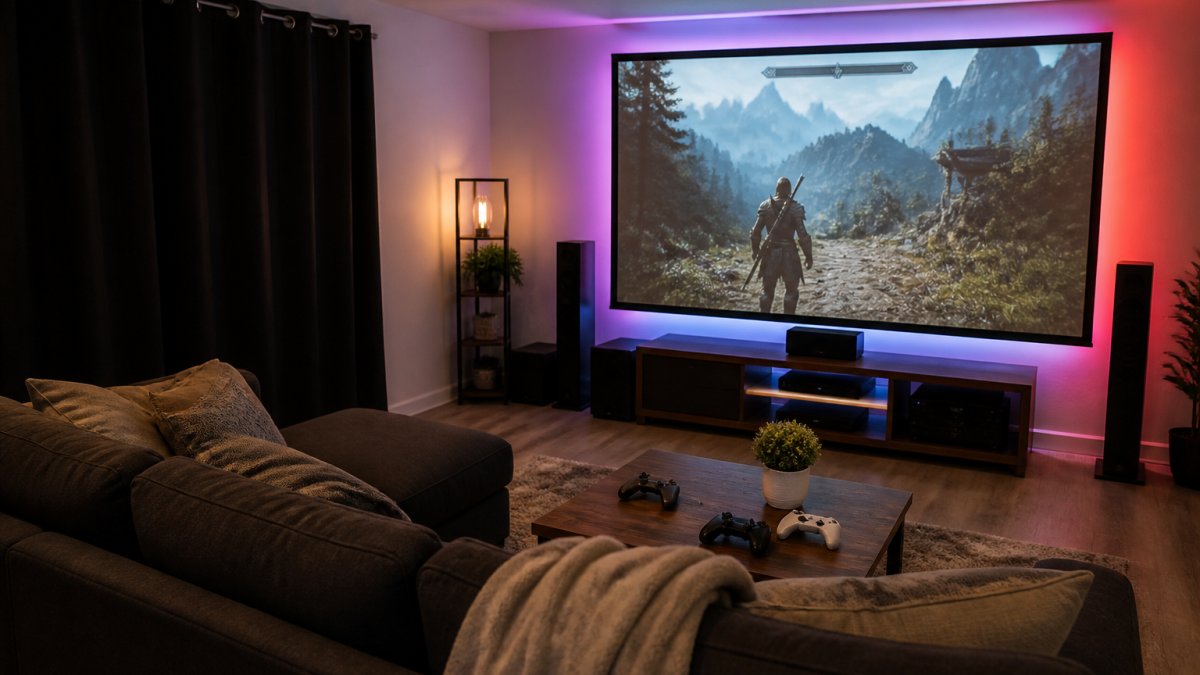
Here's a simple setup that covers most sessions:
- Full dark for horror, racing, and anything with deep shadows
- Bias light behind the screen to cut eye strain in long sessions
- Warm dim lamps in the corners for casual or party play
- Smart bulbs so you can switch scenes from your phone
Skip overhead lights aimed at the screen. They wash out the image and bounce glare back at your eyes.
Basement Gaming Room Ideas That Make the Space Feel Intentional
The best basement gaming room ideas share one trait: they treat the room as a single design instead of a pile of gear. A few moves do most of the work.
Paint the walls dark. A matte charcoal or deep navy wall behind the screen kills reflection and makes the picture pop.
Hide the cables. Run power and HDMI through wall channels or a cable raceway. A clean wall reads as a finished room.
Add a snack and drink station. A small fridge and a side table keep people in the room between rounds.
Zone the space. Use a rug under the seating to define the theater area and leave the rest open.
Go wireless where you can. Wireless speaker connectivity means fewer cables across the floor and a faster setup.
For seating, comfort matters more than style. You'll spend hours here. Pick chairs or a sectional built for long sessions, not a decorative couch that looks good and hurts after an hour.
The Gear That Makes a Basement Media Room Worth It
The gear that makes a basement media room worth the build is a big, sharp image, real surround sound, and seating you can sit in all night. Everything else is decoration.
Start with the projector. The Nova 300 Smart Home Theater Projector throws a 300-inch image on any wall, with auto-focus and keystone correction that lock in a sharp picture in seconds. The 360° stand lets you point it at a wall or a ceiling without a mount.
Then add sound. The iLive 5.1 Surround Sound System pairs with your TV, phone, or streaming box over Bluetooth, so dialogue stays clear and low-end hits actually land. Setup is plug-and-play, with no separate receiver to configure.

If you want more output, the Yamaha YHT-4950U 5.1 Home Theater System delivers 400W across 5.1 channels. And if you'd rather control everything with one remote, the iLive Home Theater System with Learning Remote runs six wired speakers from a single clicker.

Here's how the options compare:
| Setup | Best For | Key Feature |
|---|---|---|
| Nova 300 Projector | Big-screen gaming | 300-inch image, auto-focus |
| iLive 5.1 Bluetooth | Easy wireless setup | Plug-and-play, Bluetooth |
| Yamaha YHT-4950U | More output | 400W, 5.1 channels |
| iLive Learning Remote | One-remote control | Six wired speakers |
Whichever you pick, set the projector first, then place speakers around your seating, not around the room.

Building a basement media room takes planning, but the payoff is a space that works for every session, from a quiet solo run to a full house on game day. JoeMo Promo makes that build simple, with projectors that throw a 300-inch image, surround sound systems that pair wirelessly, and seating built for long nights. Every order ships free to most addresses in the Continental U.S., and a 30-day return policy means you can test the setup in your own basement. Shop the collection at JoeMo Promo and turn that empty space into the room everyone wants to be in.
Frequently Asked Questions
Why is a basement a good place for a gaming room?
Basements sit below grade, so daylight barely reaches them. That makes it easy to get a dark, glare-free picture on a screen or projector at any hour. The surrounding earth also absorbs a lot of sound, so a loud session bothers fewer people upstairs. Add the fact that basements are usually the largest unused room in a house, and you get a space built for long gaming sessions without fighting the rest of the home for it.
Are basements better for gaming than living rooms?
For dedicated gaming, yes. A living room has windows, shared traffic, and furniture arranged for conversation instead of screens. A basement media room can be laid out around the screen, with seating facing the right direction, speakers placed for surround sound, and lighting you fully control. The trade-off is that basements need moisture management and some soundproofing work, but the payoff is a room that never gets interrupted by daily life.
How can you reduce echo in a basement gaming room?
Echo comes from hard, flat surfaces: bare concrete, drywall, and tile. Add soft materials to break up reflections. An area rug over the floor, fabric curtains on at least one wall, upholstered seating, and acoustic panels at the first reflection points all help. Bookshelves and foam tiles on the walls work too. You do not need a full studio build; a rug plus curtains plus a couch typically makes a noticeable difference in a basement gaming room.
What lighting is best for a basement gaming room?
Layer your lighting instead of relying on one overhead fixture. Use dimmable recessed lights or smart bulbs for general glow, LED strips behind the screen for bias lighting that reduces eye strain, and a small lamp or two for ambient fill. Keep the area directly in front of the screen dark so the picture pops. Smart bulbs that shift color let you switch from bright for setup to warm and dim for a late-night session with one command.






















