

5 Ways to Improve Home Cinema Sound Quality
Table of Contents
- 1. Optimize Home Theater Speaker Placement for Full-Room Coverage
- 2. Treat Your Room's Home Theater Room Acoustics
- 3. Calibrate Your System with Home Theater Speaker Calibration
- 4. How to Improve Dialogue Clarity on TV and in Movies
- 5. Upgrade to a Better Surround Sound System
- Verify Your Progress: Before-and-After Testing
- Frequently Asked Questions
Last Updated: October 5, 2026
1. Optimize Home Theater Speaker Placement for Full-Room Coverage
Correct speaker placement is the foundation to improve home cinema sound quality. When positioned properly, dialogue stays clear, action sequences feel immersive, and bass distributes evenly rather than accumulating in one corner.
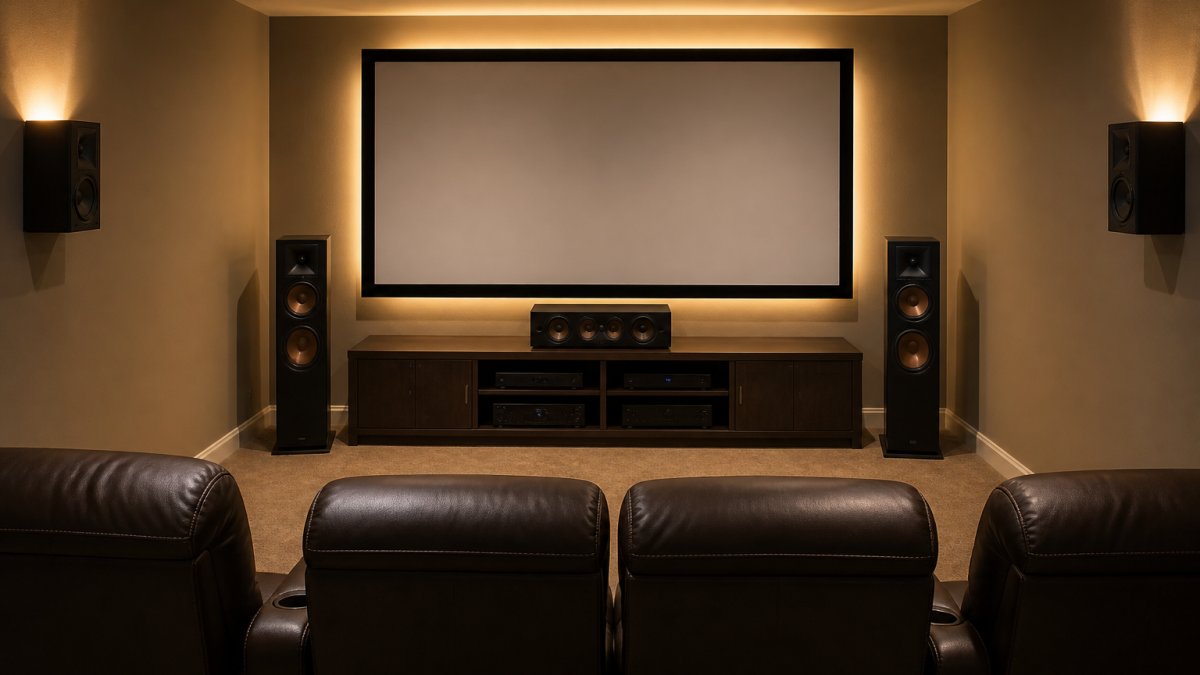
The center-channel speaker handles roughly 60% of what you hear in movies and TV. Mount it at ear level when seated (typically 24-36 inches above the floor), angled toward listener ears if your TV is wall-mounted high.
Position left and right front speakers 22 to 30 degrees from center at the same height as the center speaker. Equal distance from the listening position is important; uneven distances become obvious during action scenes.
Surround-Sound Speaker Configuration
Place surround speakers 90 to 110 degrees from center on side walls at ear level. This wraps sound around you naturally without sounding like it's coming from directly behind your head.
Mount surrounds 1 to 2 feet above ear level. For height speakers (Dolby Atmos or DTS:X), use the same height angled downward slightly toward the listening area.
Subwoofer Placement and Integration
Subwoofer placement is challenging because bass creates standing waves, spots where it piles up and others where it nearly disappears. A few consistent approaches work well.
Start by placing the subwoofer in your listening corner. Play a bass-heavy scene and walk around the room to identify where bass sounds fullest. Move the subwoofer to one of those spots, typically along the front wall.
Avoid placing the subwoofer directly in a corner; position it a few feet away or along the front wall between center and one front speaker. For multiple seating positions, place it where bass sounds even across main listening areas.
2. Treat Your Room's Home Theater Room Acoustics
Sound bounces off hard surfaces (drywall, tile, hardwood, glass), creating delayed reflections that mask detail. Strategic acoustic treatment makes a real difference without requiring professional-grade overhaul.
Heavy fabrics and soft furnishings absorb sound. A large area rug absorbs floor reflections, heavy curtains absorb window reflections, and upholstered furniture naturally absorbs sound. These items alone often improve clarity noticeably.
Reducing Echo and Reverberation
Echo is a distinct repeat from a hard wall; reverberation is multiple reflections blending together. Both mask dialogue clarity and unfocus the soundfield.
For echo, identify hard surfaces behind and to the sides of your listening position. Add absorption, a bookshelf, fabric wall hanging, or acoustic panel, to break reflection paths. Tapestries or thick curtains work well.
For reverberation, focus on corners and ceiling where sound accumulates. Soft furnishings help; if reverberation persists, add bass traps in corners or position tall bookshelves to break up reflections.
Managing Standing Waves and Bass Issues
Standing waves occur when bass bounces between parallel walls, creating boomy spots and dead spots. Bass wavelengths are long and hard to absorb, making this one of the hardest acoustic problems.
Optimize subwoofer placement first. If bass still sounds uneven, try shifting your listening position slightly; even 12 inches can move you into a smoother-sounding spot.
If bass is consistently boomy, add bass traps behind or beside the subwoofer. DIY options use rockwool wrapped in fabric; commercial traps are also available. One or two positioned strategically often tame excessive boom.
3. Calibrate Your System with Home Theater Speaker Calibration
Calibration applies theory to your specific room. Your AV receiver measures speaker distances, levels, and frequency response, then adjusts automatically. This solves uneven volume, off-center dialogue, and bass imbalance.
Place the included calibration microphone at ear level in your normal listening position and run the routine. This 10-15 minute process immediately improves sound balance.
AV Receiver Settings and Recalibration
After automatic calibration, verify speaker distance settings match your actual distances. Accuracy matters for surround placement and timing.
Fine-tune speaker levels to balance dialogue and action. Small adjustments (1-2 dB) prevent fatigue during long viewing sessions.
Crossover settings (default 80 Hz) determine which frequencies go to the subwoofer versus main speakers. Raise to 100-120 Hz if your front speakers are small.
Dynamic range compression reduces the gap between dialogue and explosions so you don't adjust volume constantly. Test both modes and choose what suits your viewing habits.
Recalibrate when you move speakers, rearrange furniture, add acoustic treatment, or upgrade components. Annual recalibration keeps everything optimized.
4. How to Improve Dialogue Clarity on TV and in Movies
To improve home cinema sound quality, dialogue clarity is the most important aspect. Most problems trace to center-channel placement, subwoofer integration, or room acoustics, but a few tweaks target dialogue directly.
iLive 5.1 Surround Sound System →
The center speaker does roughly 60% of the work. If dialogue sounds muffled or distant, check its placement: is it at ear level, angled toward listeners, and unobstructed?
If placement is correct but dialogue lacks clarity, the room may be too reverberant. Add absorption behind the couch, a tapestry, acoustic panel, or thick curtains, to improve clarity.
Some receivers include dialogue lift or speech enhancement modes. Test these features; many find them helpful for TV watching.
If the subwoofer is too loud, low-frequency rumble masks dialogue. Run it 2-4 decibels lower than the front speakers to keep bass present without overwhelming.
5. Upgrade to a Better Surround Sound System
If you've optimized placement, treated the room, and calibrated carefully but still feel something's missing, your speakers might be the limiting factor.
A quality 5.1 surround sound system delivers full-room coverage with a dedicated center channel for dialogue, left and right front speakers for the soundstage, a subwoofer for bass, and surround speakers for immersion. This is the sweet spot for most home cinemas.

At JoeMo Promo, we've handpicked several surround sound systems designed for effortless setup and immediate impact. The iLive 5.1 Surround Sound System ($519.99) pairs easily with your TV over Bluetooth, so there's no cable tangle to manage.
If you want more presence in the center, the iLive Cinema Series 5.1 Speaker System ($499.99) features a full-size 26-inch center speaker that anchors dialogue with authority.

For those wanting maximum control, the iLive Home Theater System with Learning Remote ($509.99) includes six surround speakers and a learning remote that controls your entire setup, TV included. One remote for everything eliminates the frustration of juggling multiple clickers.

The Supersonic Bold 5.1 Surround System ($519.99) is built for real bass impact. It delivers the kind of full-room presence that makes action movies feel like they're happening in your living room, not just on your screen.
For tight budgets, the JoeMo 800W Surround Sound System ($198.24) offers real subwoofer punch without the flagship price.
If you want a trusted name with proven performance, the Yamaha YHT-4950U 5.1 Home Theater System ($618.80) delivers 400W of total output power across 5.1 channels. Yamaha's reputation for audio clarity shows in the midrange and dialogue reproduction.
Matching Your Room Size and Budget
Room size matters when choosing a system. Small rooms (under 150 square feet) don't need a large center speaker or powerful subwoofer, a compact system like the JoeMo 800W handles them well. Medium rooms (150-300 square feet) benefit from a dedicated center speaker and moderate subwoofer. Large rooms (over 300 square feet) need more power and larger speakers to fill the space evenly.
Budget also guides the choice. If you're spending under $250, the JoeMo 800W gives you real surround sound without compromise. Between $250 and $550, you have excellent options: the iLive systems offer clean sound and wireless convenience. Over $550, the Yamaha and Supersonic systems bring more power and deeper bass.
| System | Price | Best Room Size | Key Strength |
|---|---|---|---|
| JoeMo 800W | $198.24 | Small to medium | Budget-friendly with real bass |
| iLive Cinema Series | $499.99 | Medium to large | Large center speaker, balanced sound |
| iLive 5.1 Standard | $519.99 | Medium to large | Plug-and-play simplicity |
| Supersonic Bold | $519.99 | Medium to large | Bass impact and presence |
| iLive with Learning Remote | $509.99 | Medium to large | Full-system control |
| Yamaha YHT-4950U | $618.80 | Medium to large | Trusted audio brand, clarity |
Verify Your Progress: Before-and-After Testing
The best way to know if your improvements actually work is to test before and after. This isn't complicated, it just requires paying attention to what you hear.
Before you make changes, watch a familiar movie or TV show and take mental notes. Pay attention to dialogue clarity, bass response, and how immersive the surround sound feels. Does dialogue sound like it's coming from the TV, or from the screen itself? Does bass feel punchy or boomy? Do you notice surround speakers, or does sound feel like it's coming from all around you naturally?
After optimizing speaker placement, treating the room, and calibrating, watch the same content again. The improvement should be obvious. Dialogue will sound clearer and more centered. Bass will feel tighter and more controlled. Surrounds will feel like they're part of the scene rather than a separate effect.
For a more formal test, use a movie with excellent sound mixing, something like Dune, Top Gun: Maverick, or The Dark Knight. These films have clear dialogue, dynamic action sequences, and precise surround mixing. They'll show you exactly what your system is capable of.
Improving home cinema sound quality doesn't require expensive equipment or professional installation. Start with speaker placement, it's free and often solves half the problem. Treat your room's acoustics with furniture and soft furnishings you probably already have. Calibrate your receiver properly. These three steps transform most setups. If you're still not satisfied, upgrading to a quality surround sound system like the ones we carry at JoeMo Promo takes your experience to theater-level immersion.
Frequently Asked Questions
What's the best placement for a center-channel speaker to improve dialogue clarity?
Mount your center-channel speaker at ear level when seated, ideally between 0-15 degrees above or below your listening position. This keeps dialogue crisp and anchored to the screen. If you can't mount it at ear level, angle it toward the listening area. A speaker that's too high or too low will make voices sound disconnected from the action on screen.
How does home theater room acoustics affect sound quality?
Hard surfaces like drywall, tile, and glass reflect sound waves, causing echo and muddiness that masks dialogue and details. Soft furnishings, curtains, and acoustic panels absorb these reflections, tightening the soundstage. Even rearranging furniture to add soft surfaces can noticeably improve clarity. The goal is balance: enough absorption to reduce reflections without making the room sound dead.
Do I really need to calibrate my home theater speaker system?
Yes. Calibration adjusts speaker distance, level, and crossover settings so sound reaches your ears evenly and in sync. Without it, dialogue may seem quiet, bass may overwhelm the mix, or surround effects will sound disconnected. Many systems include automatic calibration tools. Even a basic manual adjustment using a sound meter app on your phone can make a significant difference.
Where should I place a subwoofer for the best bass response?
Start by placing your subwoofer in the front corner of the room near your center speaker, then sit in your normal listening position and listen for consistent bass. If bass sounds boomy or thin in certain spots, try moving the subwoofer to another corner or along the front wall. The goal is even bass across all seating areas. Avoid placing it in the exact center of a wall, where standing waves tend to amplify.
What's the difference between a 5.1 and 2.1 surround sound system?
A 5.1 system has five speakers (left, center, right, two surrounds) plus a subwoofer, delivering full surround sound for an immersive experience. A 2.1 system has just left and right front speakers plus a subwoofer, which works well for stereo music and basic TV but lacks surround effects. For home cinema, 5.1 is the standard that creates true theater immersion.






















