

Outdoor Movie Night Setup Tips: Backyard Cinema Guide
Table of Contents
- What You'll Need for an Outdoor Movie Night
- Choosing the Best Outdoor Projector for Your Backyard
- Setting Up Your Projection Screen and Viewing Area
- Outdoor Movie Sound System Setup
- Backyard Movie Night Seating Ideas
- Lighting, Power, and Weather Considerations
- Troubleshooting, Legal, and Post-Event Tips
- Frequently Asked Questions
Last Updated: September 13, 2026
What You'll Need for an Outdoor Movie Night
An outdoor movie night setup starts with four things: a bright projector, a screen or smooth white surface, a sound system loud enough to fill the yard, and power. Everything else is comfort and atmosphere. This guide from JoeMo Promo walks through the full backyard cinema build, from picking the right projector to packing it away safely.
The biggest mistake is buying gear in the wrong order: a cheap projector that can't cut through evening light, then an overspent screen to compensate. Get the projector right and the rest falls into place.
The Essential Gear Checklist
- Projector with at least 3,000 lumens for dusk viewing
- Projection screen, white sheet, or a smooth light-colored wall
- Bluetooth speaker or a 5.1 surround sound system
- Streaming device, laptop, or media stick with an HDMI cable
- Extension cord rated for outdoor use, plus a portable power station for remote spots
- Seating: blankets, camp chairs, or inflatable couches
- Bug spray, citronella candles, or tiki torches
- Snacks and drinks station
- A plan for sunset timing so the picture is visible
Budget-Friendly Setup Options
You don't need a cinema budget. A white bedsheet stapled to a fence works as a projection surface, a Bluetooth speaker handles audio for small groups, and an outdoor-rated extension cord beats buying a generator.

The one place to spend real money is the projector. A dim projector ruins the experience no matter how good everything else is. JoeMo Promo's Karnstar Outdoor Cinema Projector ships with a 200-inch screen included, which removes a separate purchase and a sizing headache.

Choosing the Best Outdoor Projector for Your Backyard
The best outdoor projector is rated for the light conditions you'll actually face. A projector that looks fine indoors will look washed out on a patio at 8 p.m.
Three specs decide whether your picture holds up: brightness, resolution, and throw distance. Ignore marketing language and look at the numbers.
Key Specs: Lumens, Resolution, and Throw Distance
Lumens measure brightness. For outdoor use after sunset, aim for 3,000 or higher; under 2,000 struggles until full dark (projectorcentral.com).
Resolution determines sharpness. Native 1080p is the practical baseline for a large image; upscaled "supported" 4K is not the same as native 4K.
Throw distance is how far the projector sits from the screen. A short-throw unit fills a big screen from a few feet away, which matters in small yards.
Keystone correction squares the image when the projector sits at an angle. Automatic keystone saves you from fiddling with menus every time you move the unit.
| Spec | Minimum | Comfortable | Why It Matters |
|---|---|---|---|
| Brightness | 2,000 lumens | 3,000+ lumens | Visibility before full dark |
| Resolution | 720p | Native 1080p | Sharpness on a large screen |
| Throw distance | Matches your yard | Short-throw capable | Fits small spaces |
| Keystone | Manual | Automatic | Faster setup, straighter image |
Setting Up Your Projection Screen and Viewing Area
Screen setup is where most backyard builds go wrong. The screen must be taut, matte, and positioned so the bottom edge sits above seated eye level; a sagging sheet or glossy surface creates hot spots.
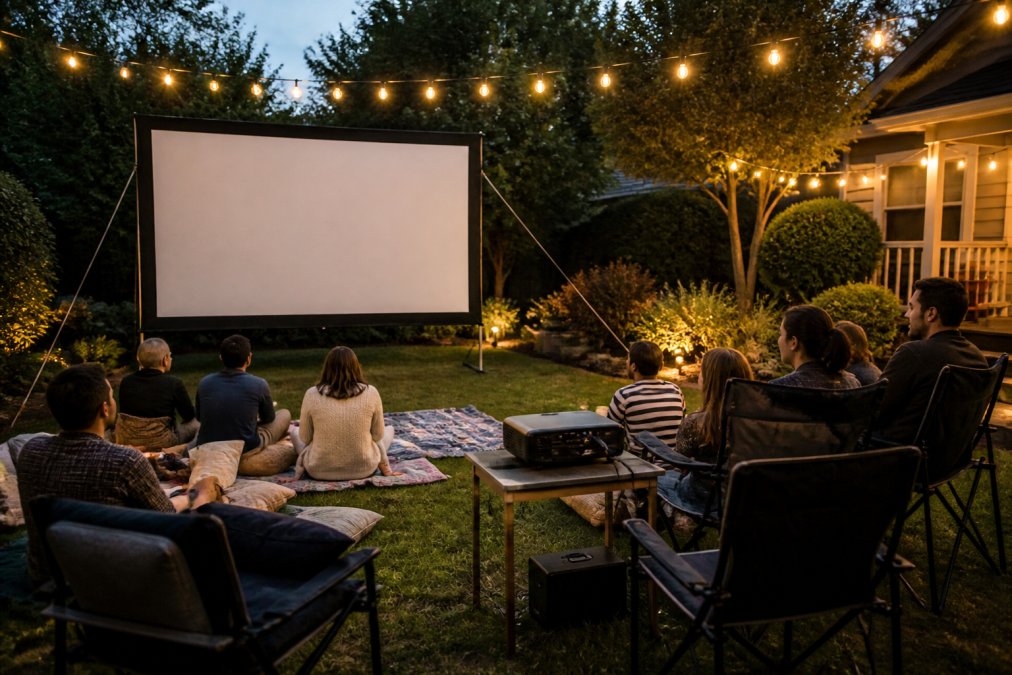
Check your viewing angle before you commit. Guests seated too far to the side see a dimmer, distorted image. Keep the seating cone within roughly 45 degrees of the screen's center line (projectorcentral.com).
Ambient light is the silent killer. Streetlights, porch lights, and a bright moon wash out contrast, so position the screen with nearby light sources behind it, not beside it.
DIY Frame vs. Inflatable Screen
A DIY frame built from PVC pipe and blackout fabric gives the best image for the money, taut, matte, and cheap. The trade-off is storage and setup time.
An inflatable screen sets up in minutes and packs down small, which suits renters and anyone without garage space. The surface is less taut, so expect slightly softer edges.
| Option | Setup Time | Image Quality | Best For |
|---|---|---|---|
| DIY PVC frame | 20-30 minutes | Excellent | Permanent backyard setups |
| Inflatable screen | 5-10 minutes | Good | Renters, travel, quick setups |
| Included screen | Varies | Good | Bundled projector kits |
Outdoor Movie Sound System Setup
Audio is the most neglected part of an outdoor movie night. Projector speakers are too weak for a yard, and dialogue disappears once guests talk.
A Bluetooth speaker handles small gatherings of up to about ten people. For anything larger, a proper surround sound system keeps dialogue crisp and gives action scenes real weight. JoeMo Promo's iLive 5.1 Surround Sound System pairs over Bluetooth with no separate receiver, so there's no cable tangle to sort out on the lawn.
The catch with any wireless audio is sync. Bluetooth can introduce a slight delay between picture and sound, and that gap is far more noticeable outdoors on a big screen than on a TV.
Position speakers beside or slightly behind the screen, angled toward the seating area. Placing them in front of the screen pushes sound away from your guests.
Backyard Movie Night Seating Ideas
Seating decides whether people stay for one movie or three. Treat it like a small amphitheater: layer rows by distance and height so every row keeps a clear line of sight.
Set the screen's bottom edge roughly 24 to 36 inches above the ground for a seated crowd, then build rows outward.
- Front row (0-8 feet from screen): blankets, floor cushions, and low beanbag-style seats for kids and anyone who wants an immersive view. Keep this row low so it doesn't block the people behind it.
- Middle rows (8-20 feet): inflatable couches and low-profile folding chairs. This is the sweet spot for image brightness and comfort.
- Back rows (20 feet and beyond): camp chairs, stadium seats, and taller folding chairs. The extra height compensates for the distance and lets guests see over the rows in front.
- Support seating: a few upright chairs with back support for older guests or anyone who can't sit low for two hours.
Stagger the rows rather than lining them up straight, offsetting each row by about half a chair width lets people in back see between heads. Leave at least 30 inches of walkway between clusters so guests reach the snack table without crossing the projector beam.
For ground seating, a waterproof tarp under the blankets keeps damp grass from soaking through. If your yard slopes, put the screen at the low end and seat guests uphill.
Lighting, Power, and Weather Considerations
Lighting and power quietly ruin outdoor movie nights: too much light kills contrast, and poor power planning kills the event.
Use warm, low-level lighting away from the screen. Tiki torches, string lights, and citronella candles set the mood without washing out the picture. Keep every light source behind the seating area, never between the projector and the screen.
For power, an outdoor-rated extension cord from the house covers most setups, check the rating and keep connections off the ground and away from sprinklers. For remote spots, a portable power station runs a projector and speaker for a full film.
Weather resistance matters more than most people plan for. Even a clear forecast can turn, and damp air affects electronics over a long evening. Keep a tarp or pop-up canopy within reach and never leave gear outside overnight.
Troubleshooting, Legal, and Post-Event Tips
Most outdoor movie night problems have simple fixes, and knowing them ahead of time saves the evening. Work through these before your first showing.
Technical Troubleshooting
Washed-out or dim picture. Ambient light is the usual cause, not a weak projector. Move light sources behind the screen, wait for fuller dark, or check whether an eco mode is dimming the image.
Keystone distortion (trapezoid image). This happens when the projector sits off-axis or tilted. Keystone correction squares the image, but digital correction crops and rescales the picture, softening detail. The better fix is to physically square the projector to the screen and use keystone only for fine adjustment.
HDMI handshake failures (no signal, or a black screen with audio). This is a negotiation problem between source and projector, not a broken cable. Unplug the HDMI cable at both ends, wait 30 seconds, and reconnect. If that fails, power-cycle the source device first, then the projector, some streaming sticks are sensitive to power-on order.
Wi-Fi signal drops in the backyard. Router signal weakens sharply through exterior walls. If streaming stutters, move the router closer, use a mesh node near the back door, or download the movie and play it locally. A phone hotspot works as backup but burns mobile data fast on HD streams.
Audio out of sync. Bluetooth introduces a slight delay that's far more noticeable on a big outdoor screen. Most streaming devices and projectors have a manual audio delay setting, nudge it in small increments and test with a dialogue-heavy scene rather than an action clip.
Legal and Neighborhood Considerations
Before you plan a late show, check three things. First, homeowners association rules, many restrict outdoor structures, late-night noise, and light spill. Second, local noise ordinances, which typically set an evening quiet-hours cutoff. Third, copyright: a private gathering of friends and family at home is generally fine, but charging admission or screening to the public generally requires a public performance license. When in doubt, keep it private and free.
A quick conversation with neighbors about your end time prevents most complaints before they start. Invite them, or at least give them a heads-up. If you're troubleshooting signal interference from streaming devices, the FCC guidance on wireless device use is a useful starting point.
Sustainable Setup
Skip disposable plastic cups and single-use decorations. Reusable snack containers, LED string lights, and cloth bunting cut waste and cost less over a season. Solar path lights handle the walkway without drawing from your power run.
Post-Event Storage and Maintenance
Storage decides how long your gear lasts. Let the projector cool completely before packing, trapped heat and condensation shorten lamp life. Store the screen folded rather than rolled tight to avoid creases, and keep everything in a sealed bin with a moisture absorber.
Check cables for kinks and fraying before each showing, and wipe the projector's lens with a microfiber cloth, never paper towels, which scratch the coating. If you store gear in a garage or shed, inspect for pests before the next event; insects and rodents chew cables and nest in folded fabric.
Frequently Asked Questions
What equipment is essential for a high-quality outdoor movie night?
You need a bright projector (at least 3,000 lumens for evening use), a large screen or white sheet, a reliable sound system, comfortable seating, and a power source. For a complete setup, the Karnstar Outdoor Cinema Projector includes a 200-inch screen and 18,000 lumens, so it works even before full dark. Add a Bluetooth speaker system like the iLive 5.1 for clear dialogue and deep bass.
How do I choose the best outdoor projector for my backyard?
Look for at least 3,000 lumens to handle ambient light, native 1080p resolution for sharp images, and keystone correction to fix angled setups. Throw distance matters too: a projector with a short throw can create a big image from just a few feet away. The Wanderlight Portable Smart Projector offers WiFi streaming and automatic focus, making it a strong pick for flexible backyard use.
What should I use for backyard movie night seating?
Comfortable seating makes or breaks the experience. Consider inflatable loungers, bean bags, folding camp chairs, or thick blankets on the grass. Arrange seats within the projector's viewing angle (usually 30 to 40 degrees off-center) so everyone sees a clear picture. For a more luxurious feel, add outdoor cushions and a few low tables for snacks and drinks.
How can I improve the sound quality for my outdoor movie sound system setup?
Place speakers on either side of the screen and slightly behind the viewing area to create a surround effect. Use a Bluetooth sound system with a dedicated subwoofer, like the JoeMo 800W Surround Sound System, to add depth. Test audio sync before the movie starts; if dialogue lags, adjust the projector's audio delay setting. Keep speakers away from reflective surfaces to reduce echo.






















