

Lighting Solutions for Compact Home Cinema Rooms
Table of Contents
- Why Lighting Matters in a Compact Home Cinema
- Small Home Theater Lighting Ideas: A Three-Layer Approach
- Dimmable LED Lights for Media Room Control
- Home Theater Lighting Placement: Where to Install Fixtures
- Bias Lighting for Projector Screen: Installation and Benefits
- Controlling Glare and Screen Reflections
- Step-by-Step Lighting Setup for Your Compact Media Room
- Common Lighting Mistakes to Avoid
- Frequently Asked Questions
Last Updated: October 13, 2026
Why Lighting Matters in a Compact Home Cinema
Proper lighting solutions for compact home cinema rooms transform a small space into an immersive viewing environment. Without them, you get harsh overhead lights, screen glare, and a cramped feel.
The challenge: enough light to move safely, darkness to keep the projector's image sharp, and control to shift from movie mode to game day in seconds.
We've helped homeowners solve this exact problem. The solution isn't more fixtures, it's layering the right types of light, placing them strategically, and controlling them with dimmers and smart scenes.
Small Home Theater Lighting Ideas: A Three-Layer Approach
Cinematic lighting rests on three layers: ambient, task, and accent, each serving a purpose and staying out of the way when you don't need it.
Ambient Lighting for Overall Mood
Ambient lighting sets the baseline, letting you move safely and see the room's shape. In a compact home cinema, it should be dimmable and warm.
Recessed ceiling lights work best for ambient duty in small spaces because they're flush with the ceiling.
Install dimmer switches, not on/off toggles, so you can dial ambient light to 10% when the movie starts and back up when credits roll.
Task Lighting for Navigation
Task lighting is purely functional: it helps you find the remote or walk to the door without tripping.
Wall sconces at waist height work perfectly in compact rooms.
Sconces should be dimmable and warm-toned: 20-30% gives enough visibility for safe movement, and 50-60% is comfortable for navigation when the movie ends.
Low-level LED strips along baseboards or under seating are another option: nearly invisible during movies but useful when lights come up.
Accent Lighting for Cinematic Depth
Accent lighting adds depth, frames the screen, and creates that "theater" feeling without interfering with the picture.
Bias lighting behind the projector screen is the most effective accent approach.
Cove lighting, indirect light hidden in architectural details, adds dimension. If your room has a ceiling soffit or crown molding, run LED strips inside it. The light bounces off the ceiling and walls, creating ambient glow without direct glare.
Color-changing accent lights shift the mood: blue feels energetic for sports, amber intimate for films.
Dimmable LED Lights for Media Room Control
Dimmable LED lights are non-negotiable for compact home cinema rooms, giving you precise control over brightness, color, and mood without rewiring.
Modern dimmable LEDs don't flicker or hum and don't require special dimmer switches (though quality dimmers improve reliability).
Choose LEDs rated for dimming, not all LEDs dim smoothly. Look for "dimmable" explicitly on the package. Warm-white LEDs (2700K) dim more naturally than cool tones.
Smart LED bulbs add convenience.
For compact rooms, prioritize dimming on three zones: ceiling ambient, wall sconces, and accent strips.
Home Theater Lighting Placement: Where to Install Fixtures
Placement determines whether lighting enhances or ruins your viewing experience. In a compact room, every fixture must earn its spot.
Recessed Ceiling Lights and Downlights
Recessed lights should run parallel to the screen, not directly above seating.
Space them 4-5 feet apart. In a 10-by-12-foot room, three lights is usually enough. Too many creates hot spots. Too few leaves dark corners.
Avoid recessed lights directly above the seating area, where they create screen glare and cast shadows on viewers' faces. Position them behind the seating zone, aimed at the walls and ceiling.
For compact spaces, choose recessed lights with narrow beam angles (25-40 degrees) to focus light precisely and reduce spill onto the screen.
Wall Sconces and Side Lighting
Wall sconces belong on the side walls, not the front or back, mounted at 3.5 to 4 feet high, just below eye level when seated.
Space them 6-8 feet apart; in a small room, one sconce per side wall is often sufficient. Position them mid-wall, not in corners where light bounces chaotically.
Sconces should face slightly downward (30-45 degrees) to light the floor and lower walls without ceiling glare.
Cove and Indirect Lighting
Cove lighting works best along the perimeter where wall meets ceiling. With crown molding or a soffit, run LED strips inside it.
Light bounces off the ceiling and diffuses through the room, creating ambient glow without visible sources, exactly what you want in a theater.
In compact rooms, cove lighting on two opposite walls (usually front and back) balances light distribution without overloading the space.
Bias Lighting for Projector Screen: Installation and Benefits
Bias lighting is a subtle but powerful tool: an LED strip behind the projector screen that creates a soft glow around the image edges.
Installation is straightforward: mount the LED strip along the back edge of the screen frame with adhesive backing or small brackets, hidden from direct view so you see only the glow.
Choose warm white (2700K) for movies and soft blue (4000-5000K) for sports and gaming. Many strips include color-changing options and remote controls.
Nova 300 Smart Home Theater Projector →
For compact rooms, a single bias light strip is sufficient.
Controlling Glare and Screen Reflections
Screen glare is the enemy of small home cinema rooms. Without proper lighting control, reflections wash out your image and ruin the experience.
Reduce direct light on the screen. Never position recessed lights directly above the screen.
Control brightness strategically. During movies, dim all lights to 5-10% for the darkest possible environment and minimal reflection.
Choose the right screen material. If you're using a projection screen (not just a white wall), select one with high contrast and low reflection.
Step-by-Step Lighting Setup for Your Compact Media Room
Follow these steps to build a lighting system that works.
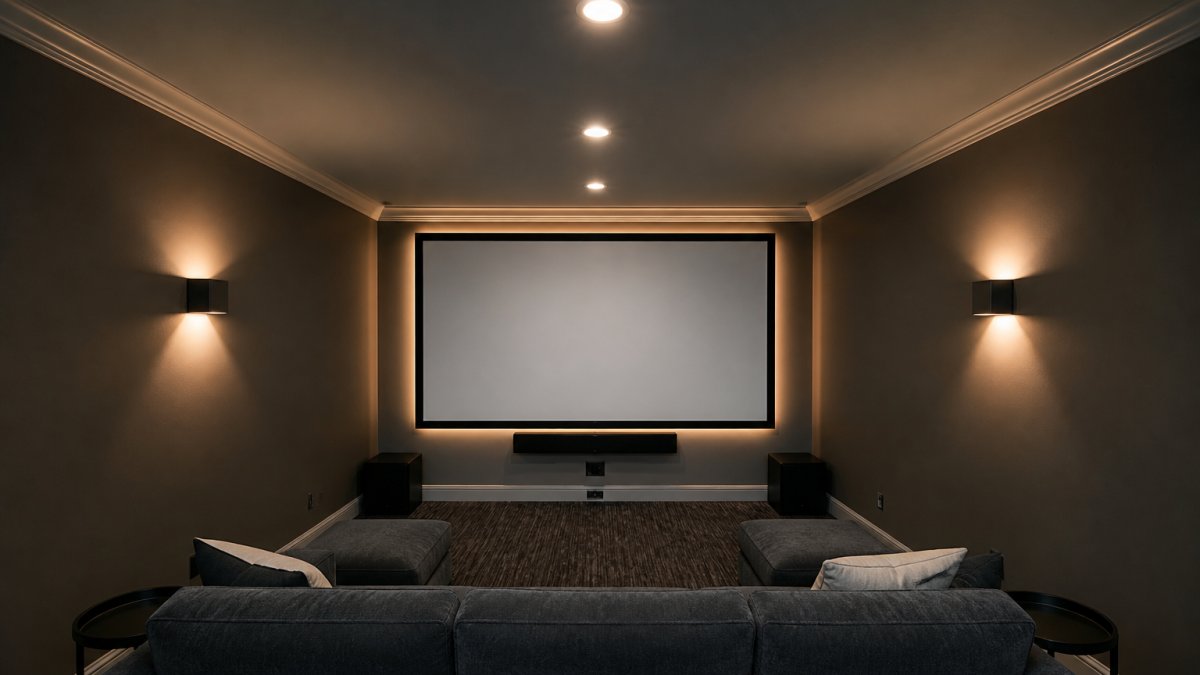
Step 1: Measure Your Room and Plan Fixture Locations
Start with dimensions: measure length, width, and ceiling height, then sketch the layout, marking the screen location, seating area, and walls.
For a typical compact room (10-by-12 feet), plan for:
- 3 recessed ceiling lights in a center line
- 2 wall sconces (one per side wall)
- 1 bias lighting strip behind the screen
- Optional: cove lighting along one or two walls
Mark fixture locations on your sketch: recessed lights 3-4 feet back from the screen and evenly spaced, sconces at 3.5-4 feet high on side walls, roughly centered.
Verify that no fixture points directly at the screen and that all are reachable for maintenance.
Step 2: Choose Dimmers and Smart Controls
Decide on your control method: standard dimmer switches on the wall, or smart lighting with app control and scenes.
For compact rooms, a hybrid approach works well: standard dimmer switches for ambient and sconce lighting, plus smart bulbs or strips for accent and bias lighting.
If going smart, choose a system that integrates with your projector and audio setup. Many platforms sync with home theater receivers, so "Movie Mode" dims lights and adjusts the receiver at once.

Budget for quality dimmers. Cheap dimmers cause LED flicker and hum. Spend extra on dimmers rated for LED loads, they're smoother and more reliable.
Step 3: Install Recessed and Wall-Mounted Fixtures
Recessed light installation requires cutting ceiling holes. If you're not comfortable with that, hire an electrician, since the cost is worth avoiding mistakes.
Wall sconces are easier: mount them at 3.5-4 feet high using existing electrical boxes. If none exist, surface-mount sconces with their own wiring, less invasive than running new circuits.
Test all fixtures before closing up the ceiling or walls. Verify that lights work, dim smoothly, and don't create unwanted shadows or glare.
Step 4: Add LED Strips and Test Brightness Levels
Install bias lighting strips behind your screen. Use adhesive backing or small clips. Connect the strip to power (most use USB or low-voltage plugs).
If adding cove lighting, run LED strips inside any crown molding or soffits, secured with clips or adhesive, and keep the light hidden from direct view so only the glow shows.
Connect all LED strips to dimmers or smart controllers. Test them at various brightness levels: 5%, 20%, 50%, 100%.
Now test the complete system. Sit in the viewing area, turn on the projector, and run a movie scene, adjusting each layer:
- Dim ambient lights until the screen image is clear
- Adjust sconces until the floor is visible but not distracting
- Fine-tune bias lighting until it enhances without washing out the image
Note your preferred brightness levels to program your lighting scenes next.
Step 5: Program Lighting Scenes for Different Activities
Create named scenes that match your activities:
| Scene Name | Ambient Light | Sconces | Accent/Bias | Use Case |
|---|---|---|---|---|
| Movie Mode | 5-10% | 5-10% | 15-20% | Films and cinematic content |
| Game Day | 30-40% | 40-50% | 30-40% | Sports and competitive gaming |
| Casual Viewing | 40-50% | 50-60% | 20-30% | TV, streaming, casual use |
| Cleanup | 80-100% | 80-100% | 0% | Room maintenance and exit |
| Reading | 60-70% | 70-80% | 0% | Pre-movie prep or relaxation |
Program these scenes into your dimmer system or smart lighting app, assigning each to a button or voice command for instant activation.
Test each scene to verify smooth transitions and no unwanted glare or shadows.
Common Lighting Mistakes to Avoid
Learning from others' mistakes saves time and money. Here are the most common errors.
Mistake 3: Ignoring color temperature. Mixing warm (2700K) and cool (4000K+) lights creates visual chaos.
Mistake 4: Skipping dimmers. A room with only on/off lights cannot achieve cinematic mood.
Mistake 5: Installing bias lighting too bright. Bias lighting should be subtle.
Mistake 7: Using cheap LED bulbs. Budget LEDs flicker, don't dim smoothly, and fail quickly. Invest in quality bulbs and dimmers.
Creating a well-lit compact home cinema room requires planning, but the payoff is enormous. The Nova 300 Smart Home Theater Projector from JoeMo Promo pairs perfectly with this lighting setup, its auto-focus and keystone correction mean you get a sharp image regardless of your fixture placement, and the 300-inch projection fills even compact rooms with cinematic impact. With proper lighting control and a quality projector, your compact room becomes a theater. Shop the Collection and transform your movie nights today.
Frequently Asked Questions
What brightness level should home theater lights be set to while watching a movie?
During movie viewing, aim for very low ambient light, ideally 5% to 10% of full brightness. This preserves screen contrast and prevents glare without leaving the room completely dark. Use a dimmer to adjust gradually as your eyes adapt. For compact rooms especially, even minimal ambient light can wash out the image, so bias lighting and indirect cove fixtures work better than direct downlights during playback.
How can you reduce screen glare from room lighting in a compact home cinema?
Position lights away from the screen and seating area. Use indirect lighting (cove, wall sconces, or uplighting) rather than downlights that point toward the viewing plane. Install dimmable fixtures so you can lower brightness during movies. Add dark trim or matte paint around the screen to absorb light. Bias lighting placed behind the screen adds depth without creating reflections on the projection surface.
Are LED strip lights good for a home theater?
Yes, LED strips are excellent for home theater lighting. They're energy-efficient, run cool, and work well for bias lighting behind screens and cove lighting along ceilings. Choose warm-color temperature strips (2700K-3000K) for a cinematic mood. They're easy to install in tight spaces, dimmer-compatible, and often available with smart controls for scene programming. Avoid bright white or cool-blue strips during movie viewing, as they create harsh shadows.
Where should lights be placed in a compact home theater to avoid blocking the view?
In small rooms, keep lights above the sightline and away from the screen. Use recessed ceiling lights positioned toward the room edges rather than directly above seating. Wall sconces work well at eye level on side walls, behind seating, or in corners. Cove lighting along the ceiling perimeter provides ambient glow without obstruction. Bias lighting goes behind the screen. This layered placement keeps the viewing area clear while maintaining cinematic atmosphere.






















