

How to Set Up Home Theater in Small Room
Table of Contents
- Measure Your Room and Calculate Screen Size
- Choose Between a Television and Projector for Your Space
- Plan Your Small Home Theater Room Layout
- Execute Your Small Room Projector Setup
- Design Home Theater Speaker Placement for Compact Spaces
- Select Small Home Theater Seating Ideas That Maximize Space
- Optimize Acoustics and Control Reflections
- Complete Your Setup and Calibrate for Best Results
- Frequently Asked Questions
Last Updated: October 9, 2026
Measure Your Room and Calculate Screen Size
Learning how to set up home theater in small room starts with understanding your space. Measure the room's length, width, and height. Write these numbers down. You'll use them for every decision that follows.
Next, determine viewing distance. This is the distance from your seating to the screen. Sit where you plan to watch, then measure to the wall where your screen will go.
Use this simple rule: divide your viewing distance by 1.5 to get minimum screen width, and by 2.5 to get maximum. If you're 10 feet away, a screen between 4 and 6.7 feet works well. This keeps the image sharp and prevents eye strain.
For small rooms, this calculation matters more than in larger spaces. A screen that's too big will force you to sit too close. A screen that's too small wastes your room's potential. Get this right, and everything else becomes easier.
Choose Between a Television and Projector for Your Space
A television and a projector serve different needs in small rooms. Understanding the trade-offs helps you pick the right one.
Televisions work best when:
- Your room is 10-12 feet deep or less
- You want a bright image for daytime viewing
- You prefer simplicity with no installation required
- Your budget is tight
A TV takes up wall space but needs no setup beyond plugging it in. The image is always bright and sharp. For small rooms under 12 feet deep, a 55-65 inch TV often provides the cinematic feel you want.
Projectors work best when:
- You want an immersive, theater-like experience
- Your room is dark or has controllable lighting
- You value screen size over brightness
- You can mount the projector on a ceiling or stand
The Nova 300 Smart Home Theater Projector from JoeMo Promo delivers a 300-inch image in small rooms. Its rotating 360-degree stand lets you aim it at a wall or ceiling without permanent mounting. Auto-focus and keystone correction lock in a sharp picture in seconds, so you skip the manual adjustments.
For small rooms, a projector offers something a TV cannot: massive screen size without eating floor space. The trade-off is that projectors need darkness to shine. If your room gets bright sunlight, a TV might serve you better.
Plan Your Small Home Theater Room Layout
Layout determines how well your small home theater in a small room will actually work when you know how to set up home theater in small room properly.
Mark the screen wall first. This is usually the wall opposite your seating. Measure 1.5 feet down from the ceiling. This is where your screen or projector should aim. Avoid windows and light sources on this wall.
Next, position your seating. In a small room, you have limited options. Most compact setups use a single row of recliners or a sofa. Place seating at the viewing distance you calculated earlier.
Plan speaker placement zones. You'll need space for a center speaker below the screen, left and right speakers near the screen corners, and surround speakers on the side walls. In tight rooms, wall-mounted speakers save floor space.
Here's what a compact layout looks like:
- Screen or projector: centered on front wall
- Seating: 10-12 feet away, in a single or two-row arrangement
- Center speaker: below screen, 6-12 inches above floor level
- Left and right speakers: 2-3 feet left and right of center
- Surround speakers: mounted on side walls, 1-2 feet above ear level when seated
- Subwoofer: corner placement, away from seating
Sketch this on paper before you buy. Small rooms leave no room for mistakes.
Execute Your Small Room Projector Setup
If you chose a projector, setup requires a few careful steps. Start by choosing a mounting location.
Mount the projector 8-12 feet from your screen wall. This distance determines image size. Closer mounting gives smaller images. Farther mounting gives larger images.
The Nova 300 Smart Home Theater Projector includes a rotating stand, so you can skip ceiling installation if you prefer. Place the stand on a shelf, table, or cart.

Run power to the projector location. Use a power strip with surge protection. Keep cables behind furniture or in cable trays to avoid tripping hazards.
Connect your streaming devices. Most modern projectors have built-in WiFi and Bluetooth. Connect your phone, streaming box, or gaming console wirelessly. This eliminates cable clutter in small rooms.
Test the image before finalizing placement. Project onto your screen or wall. Check for focus, brightness, and color. Adjust the projector height or angle if needed.
Design Home Theater Speaker Placement for Compact Spaces
Speaker placement makes or breaks audio quality in small rooms. Bad placement muddles dialogue. Good placement creates immersion. In compact spaces, placement is even more critical because sound bounces off walls more intensely.
Start with the center channel speaker. This speaker handles dialogue and center-screen action. Place it directly below your screen, 6-12 inches above floor level. Aim it slightly upward toward ear level when seated. Keep it at least 2 feet away from corners to reduce bass buildup.
Position left and right speakers next. These handle ambient sound and side action. Place them 2-3 feet left and right of the center speaker. Angle them slightly inward toward the listening area. Mount them at ear level or slightly above.
Surround speakers come last. These add immersion by placing sound behind and to the sides of the listening area. Mount them on the side walls, 1-2 feet above seated ear level. Angle them downward slightly toward the seating area.
5.1 Surround Sound Configuration
A 5.1 system includes five speakers plus a subwoofer. The five speakers are: center, left, right, and two surrounds. This configuration works well in small rooms because it creates a believable surround field without overwhelming the space.

The iLive 5.1 Surround Sound System from JoeMo Promo delivers full surround sound with plug-and-play setup. It pairs over Bluetooth, so no receiver or tangled cables clutter your room. Dialogue stays crisp. Explosions rumble. Music sounds full.
For tight spaces, 5.1 is the sweet spot. It's immersive without requiring complex wiring or multiple ceiling speakers. Most small rooms can accommodate five speakers without looking cluttered.
Nova 300 Smart Home Theater Projector →
Managing Bass in Small Rooms
Bass behaves differently in small rooms. Low frequencies bounce around and pile up in corners, creating boomy, uneven sound. A subwoofer helps, but placement matters enormously.
Never place a subwoofer in a corner. Corners amplify bass and create dead spots in the listening area. Instead, place the subwoofer 1-2 feet away from a corner. Experiment with different positions. Move it 6 inches at a time and listen. You'll find a spot where bass sounds balanced, not boomy.
If bass still sounds muddy, reduce the subwoofer volume slightly. In small rooms, less is often more. A subwoofer set to 70-80% volume often sounds better than maximum volume.
The JoeMo 800W Surround Sound System includes a 6.5-inch subwoofer with built-in EQ modes. These modes let you tune bass to your room without a separate receiver. Switch between modes to find what sounds best.
Select Small Home Theater Seating Ideas That Maximize Space
Seating is where you spend your time, so choose carefully. In small rooms, every inch counts. Your options are limited, but they're not bad.
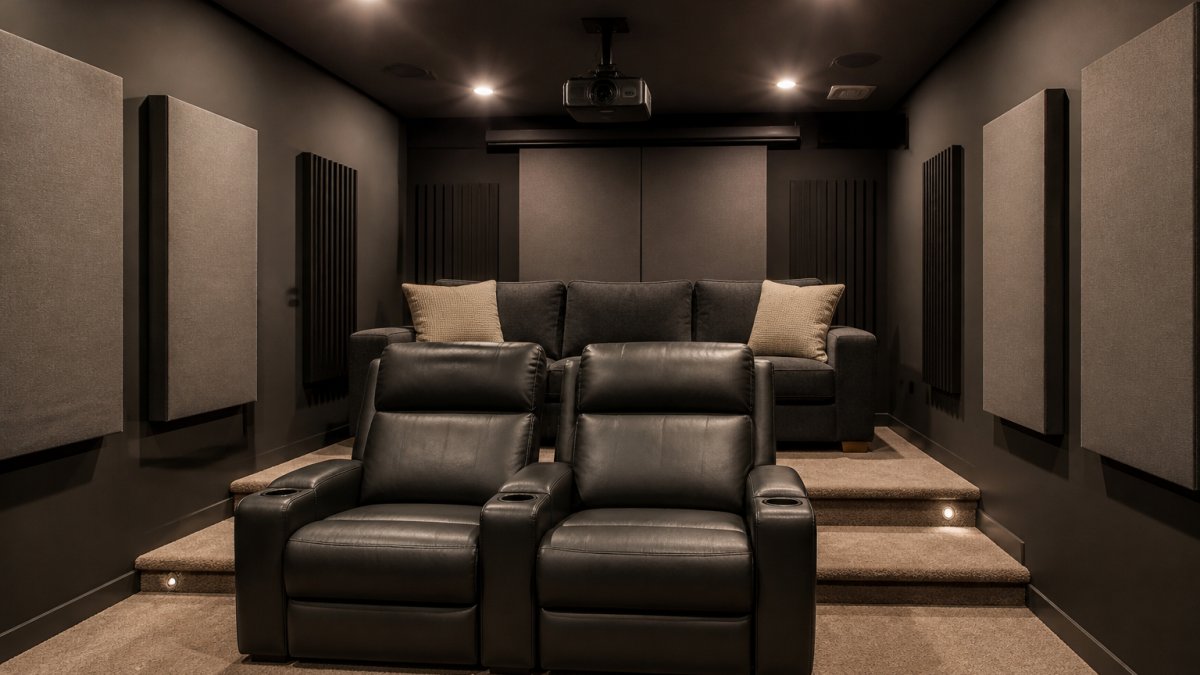
Single-row seating works for rooms 10-12 feet deep. Use two or three recliners. Space them 2-3 feet apart.
Two-row seating works for rooms 12-15 feet deep. Put one recliner in front and a compact sofa or loveseat in back.
Compact recliners are your best friend in small rooms. They're narrower than standard recliners and take up less floor space when reclined. Look for models under 35 inches wide.
Loveseats work for back rows. They're shorter than full sofas, which helps in rooms with low ceilings.
Avoid sectionals and large sofas in small rooms. They consume floor space and block access to equipment. Stick with individual recliners or small loveseats.
Leave at least 18 inches behind the back row for cable runs, air circulation, and future adjustments. This small gap prevents your room from feeling cramped.
Optimize Acoustics and Control Reflections
Sound reflects off hard surfaces. In small rooms, reflections pile up quickly, creating echo and muddiness. Control reflections, and your audio quality jumps dramatically.
Identify hard surfaces: drywall, tile, hardwood, glass. These reflect sound. Soft surfaces absorb sound: carpet, curtains, upholstered furniture, foam panels.
Add soft surfaces to balance reflections. Hang curtains on the screen wall. They absorb sound and reduce glare from windows. Place a rug under the seating area.
For serious acoustic control, add acoustic panels. These foam or fiberglass panels mount on walls. Place them at ear level on side walls where sound reflects most.
Avoid hard, reflective surfaces on the screen wall. Drywall alone reflects too much sound. Paint the wall a dark color to reduce light reflection. Add fabric panels or curtains to absorb sound.
Bass traps help in corners. These specialized panels absorb low-frequency energy where it tends to build up. In small rooms, bass traps in two opposite corners can tame boomy bass.
Complete Your Setup and Calibrate for Best Results
Once everything is in place, calibration ensures your system sounds its best. Calibration is the process of adjusting audio and video settings to match your room.
Video calibration is simple. Turn on your projector or TV. Project a test image. Check focus and brightness. Adjust color if needed.
Audio calibration takes more care. Play a movie with clear dialogue. Sit in your main listening position. Listen for balanced sound. Adjust speaker volume so each speaker sounds equally loud from the listening area.
Start with the center speaker. Turn up the center volume until dialogue sounds clear and full. Then adjust left and right speakers to match.
Test with different content. Watch a movie, play a game, listen to music. Adjust as needed. Small rooms need more tweaking than large ones because reflections vary by content.
Use a sound level meter app on your phone to verify levels. Aim for 75 decibels at the listening position. This is loud enough for immersion without causing fatigue.
Setting up home theater in a small room is achievable with the right planning and equipment. Start with the Nova 300 projector and the iLive 5.1 system, both deliver cinematic quality without overwhelming your space.

Frequently Asked Questions
Can you actually fit a 300-inch projection in a 12-foot-deep room without sitting too close?
Yes, but only if you adjust your expectations. A 12-foot room works best with a 100- to 120-inch screen rather than the full 300 inches. The Nova 300 Smart Home Theater Projector can display up to 300 inches, but in a small room, you'll want to reduce the image size by moving the projector closer to the wall or using keystone correction. The rule of thumb: viewing distance should be 1.5 to 2.5 times the screen width. For a 120-inch screen, sit 15 to 20 feet away. In a 12-foot room, aim for an 80- to 100-inch display to avoid eye strain and blurriness.
What's the best speaker configuration for a small home theater room?
A 5.1 surround sound system works well in compact spaces without overwhelming the room. Place the center channel directly below or above your screen for dialogue clarity, position left and right speakers at ear level roughly 60 degrees from center, and put surrounds on the side or rear walls at ear height or slightly above. The iLive 5.1 Surround Sound System ($519.99) or JoeMo 800W Surround Sound System ($198.24) both offer Bluetooth connectivity and plug-and-play setup, eliminating the need for a separate receiver or visible cables. In very tight spaces, a 2.1 configuration (left, right, subwoofer) is a viable alternative.
How do I manage bass response in a small room without it sounding boomy?
Small rooms amplify bass frequencies, making sound muddy if not managed correctly. Start by experimenting with placing your subwoofer around the room and listening for the smoothest bass response. Use your sound system's EQ modes or built-in controls to dial down bass slightly. Soft furnishings like curtains, rugs, and upholstered seating absorb some bass energy. If you're using the JoeMo 800W system, its built-in EQ modes let you tune the sound to your room without additional equipment.
Do I need professional installation, or can I set this up myself?
Most small-room home theater setups are DIY-friendly. Projectors like the Nova 300 feature automatic focus and keystone correction, so you don't need manual calibration. Wireless speaker systems eliminate cable runs. The 360° stand on the Nova 300 lets you position the projector on a shelf, table, or stand without wall mounting. For ceiling-mounted projectors, you may want professional help with brackets and wiring. Always check your projector's manual for recommended throw distance and mounting height before installation.






















