

Bluetooth Transmitter vs Receiver for Home Theater
Table of Contents
- Bluetooth Transmitter vs Receiver: Which Does Your Home Theater Need?
- Transmitter vs Receiver: Side-by-Side Comparison
- How to Fix Bluetooth Audio Lag in Your Home Theater
- Why You Need a Low Latency Bluetooth Adapter for TV
- Wired vs Wireless Audio: Optical, 3.5mm, and RCA Compared
- Ready-to-Use Bluetooth Home Theater Systems
- Conclusion: Picking the Right Setup for Your Room
- Frequently Asked Questions
Last Updated: October 2, 2026
Bluetooth Transmitter vs Receiver: Which Does Your Home Theater Need?
If your TV has no Bluetooth output, a Bluetooth transmitter sends audio from your TV to wireless speakers or headphones, while a Bluetooth receiver pulls audio from a phone or tablet into your wired sound system. Most home theaters need the transmitter: the TV is the source, the speakers are the destination.

That distinction trips up buyers constantly: someone buys a receiver, plugs it into their TV, and nothing plays.
The Bluetooth Special Interest Group's core specification overview defines both roles clearly, and they are not interchangeable. Below, we break down what each does, how to fix Bluetooth audio lag, and which one your room actually needs.
What a Bluetooth Transmitter Does
A Bluetooth transmitter takes an audio signal from a source like a TV and broadcasts it wirelessly to headphones or a soundbar.
Transmitters matter when your TV lacks built-in Bluetooth output.
Common setups include:
- TV to wireless headphones for late-night viewing
- TV to a Bluetooth soundbar across the room
- Laptop to a portable speaker for backyard movie nights
One limitation: a basic transmitter pairs with one device at a time. Multipoint models hold two connections for two sets of headphones.
What a Bluetooth Receiver Does
A Bluetooth receiver works in the opposite direction: it accepts a wireless signal from a phone, tablet, or computer and feeds it into a wired amplifier, AV receiver, or older speaker system.
It is the right tool when your speakers sound great but have no wireless input.
Where it falls short: a receiver cannot pull audio out of your TV unless the TV itself transmits Bluetooth. Many older TVs do not, which is why people buy the wrong device.
Transmitter vs Receiver: Side-by-Side Comparison
The core difference is signal direction: a transmitter sends audio out, a receiver brings audio in. Pick based on which end of your setup lacks wireless capability.
| Feature | Bluetooth Transmitter | Bluetooth Receiver |
|---|---|---|
| Signal direction | Sends audio out | Accepts audio in |
| Typical source | TV, laptop, console | Phone, tablet, PC |
| Typical destination | Headphones, soundbar | Wired speakers, AV receiver |
| Common port | Optical, RCA, 3.5mm | RCA, 3.5mm |
| Best for | TVs without Bluetooth output | Older wired sound systems |
| Home theater need | High | Low to moderate |
Some devices are bi-directional and switch between both modes. They cost more but solve both problems if you are unsure which direction you need.

How to Fix Bluetooth Audio Lag in Your Home Theater
Bluetooth audio lag shows up as lip-sync delay: the actor's mouth moves, then the sound arrives a beat later. It is the most common home theater complaint, and the fix is almost always the codec, not the speaker or transmitter.
Why Bluetooth Adds Delay in the First Place
Every Bluetooth audio link encodes the signal on one end and decodes it on the other, and the codec determines how long that takes.
Low-latency codecs shrink that window with smaller frame sizes and faster processing. The three you will see named on home theater gear are:
- aptX Low Latency (aptX LL): Qualcomm's low-latency variant, commonly cited around 40 milliseconds of added delay, close to the threshold where most viewers stop noticing.
- aptX Adaptive: A newer Qualcomm codec that dynamically trades bitrate for latency, targeting roughly 50 to 80 milliseconds depending on conditions.
- LC3 (Low Complexity Communication Codec): The codec introduced with Bluetooth LE Audio. It is designed for lower power and lower latency than SBC, and it is the direction the standard is moving.
AAC, which Apple devices favor, sounds good but is not low-latency, it was built for efficiency, not sync. LDAC, Sony's high-bitrate codec, prioritizes quality over latency and is a poor fit for critical viewing.
The Fallback Trap
Here is the mechanism most guides skip: Bluetooth negotiates the best codec both ends support. If your transmitter speaks aptX LL but your headphones only speak SBC and AAC, the link falls back to SBC, and you are back to 150-plus milliseconds of delay.
That is why a $30 transmitter and $300 headphones can still produce terrible lip-sync: the expensive headphones may not support aptX LL at all.
The Practical Fix Order
Work through these in sequence, because each step rules out a different cause:
- Confirm codec overlap. Check the spec sheet for both the transmitter and the receiving device. You need a shared low-latency codec, not just one device that supports it.
- Force the codec if you can. Some transmitters and headphones have a companion app or a physical switch that locks the codec instead of letting the devices auto-negotiate down to SBC.
- Reduce interference. Move the transmitter away from your Wi-Fi router and any 2.4 GHz cordless phone base. Bluetooth and Wi-Fi share the 2.4 GHz band, and congestion causes retransmissions that add delay.
- Keep line of sight. Bluetooth is a radio link. Walls, bodies, and metal shelving attenuate the signal and trigger retries.
- Use the TV's audio delay adjustment. Many TVs and AV receivers have a lip-sync or A/V sync setting that shifts audio timing in small increments. This can compensate for a fixed codec delay.
- Fall back to wired optical for critical viewing. If sync still bothers you, optical carries zero added latency.
How Much Delay Is Noticeable?
Most audio engineers cite the perceptual threshold for audio-video sync at roughly 30 to 40 milliseconds of lag before viewers notice. Below that, the brain stitches the streams together; above it, the mismatch reads as a dubbed foreign film. That is why aptX LL's roughly 40 ms sits right at the edge, acceptable for most, marginal for sensitive viewers.
A Note on Bluetooth LE Audio and Auracast
The Bluetooth Special Interest Group introduced LE Audio with the LC3 codec as the successor to classic Bluetooth audio. LC3 delivers better quality at lower bitrates and lower latency than SBC, and it enables Auracast broadcast audio, one transmitter sending to many receivers. As of 2026, adoption is uneven: many TVs and soundbars do not support LE Audio, and older headphones cannot be upgraded.
Why You Need a Low Latency Bluetooth Adapter for TV
A low latency Bluetooth adapter for TV is the single upgrade that fixes most sync complaints.
The adapter handles analog-to-digital conversion and codec negotiation. A good one supports aptX Low Latency or the newer LC3 codec, both designed to keep audio and video aligned.
iLive 5.1 Surround Sound System →
What most guides miss: human perception catches delay around the 30 to 40 millisecond mark.
Wired vs Wireless Audio: Optical, 3.5mm, and RCA Compared
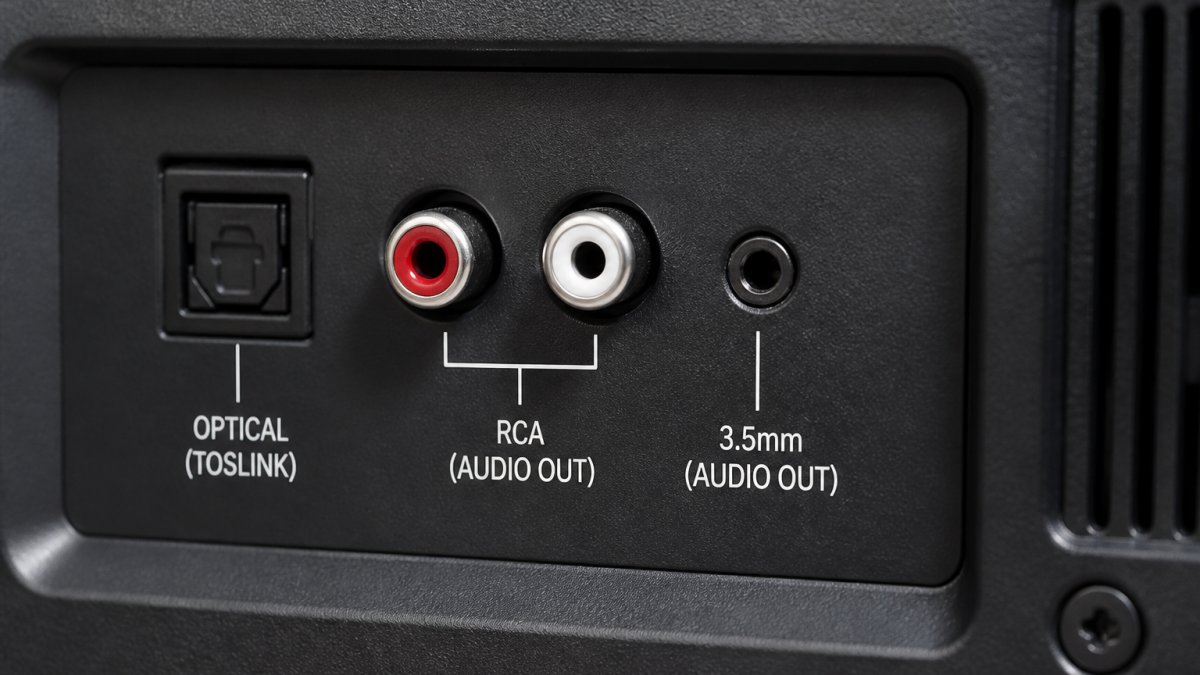
Wired connections still win on fidelity and zero latency, but "wired" is not one thing. Optical, RCA, and 3.5mm carry different signal types, have different channel limits, and behave differently over distance. Picking the wrong one is a common reason a transmitter sounds worse than it should.
Optical (TOSLINK): Digital, Interference-Immune, Stereo-Limited
Optical carries a digital signal as pulses of light through a fiber cable. Being light, it is immune to the electrical interference that plagues copper, no hum, no ground loop, no buzz.
The catch is bandwidth. A standard TOSLINK optical connection on most TVs carries two channels of uncompressed PCM stereo.
One more detail: optical requires a digital-to-analog converter (DAC) somewhere in the chain if the destination is analog.
RCA: Analog Stereo, Simple, Prone to Noise
RCA carries an analog signal over two copper conductors, one per channel. It is the standard connection on older AV receivers, amplifiers, and pre-HDMI TVs.
Because the signal is analog and the cable is copper, RCA is vulnerable to two problems:
- Ground loops. If the TV and the amplifier are plugged into different circuits, a low-frequency hum can ride the ground connection. A ground-loop isolator fixes it.
- Signal degradation over distance. Analog voltage drops and picks up noise as cable length increases. Keep RCA runs short, under about 6 feet is safe, longer runs invite hiss.
RCA is stereo-only. It cannot carry a surround signal, and it cannot carry digital audio at all.
3.5mm: Universal, Convenient, the Noisiest of the Three
3.5mm (aux or headphone jack) carries analog stereo on a single TRS or TRRS connector. It is the most universal audio port in consumer electronics, phones, laptops, TVs, portable speakers, and headphones all use it.
The trade-off is noise. A 3.5mm cable carries an unbalanced signal, meaning the audio and the ground share the same reference.
Which Cable Should You Actually Use?
The answer depends on what your TV outputs and your transmitter accepts:
| Connection | Signal Type | Channels | Latency | Interference Risk | Best Use |
|---|---|---|---|---|---|
| Optical | Digital PCM stereo | 2 (or compressed surround) | None | None (light) | TV to soundbar, transmitter, or receiver |
| RCA | Analog stereo | 2 | None | Moderate (ground loops, long runs) | Older amplifiers and AV receivers |
| 3.5mm | Analog stereo | 2 | None | High over distance | Headphones, short aux runs, portable gear |
Priority order for a TV connection: optical first, RCA second, 3.5mm last. Optical gives the cleanest signal and least chance of hum. RCA is the fallback for legacy gear. 3.5mm is the universal option when nothing else is available, but keep the cable short.
Where Wireless Fits In
Wireless adds convenience but also latency, and it depends on codec support at both ends. The strongest setups are hybrid: a wired optical connection from the TV to the main sound system for critical viewing, plus a Bluetooth transmitter on the same TV for late-night headphone listening. You get zero-latency audio when sync matters and wireless freedom when it does not.

Ready-to-Use Bluetooth Home Theater Systems
The simplest path skips the adapter question entirely: a surround sound system with Bluetooth built in already handles the transmitter and receiver roles.
The iLive 5.1 Surround Sound System pairs with your TV, phone, or streaming box and sets up plug-and-play, with no separate receiver to configure.
For a step up in output, the Yamaha YHT-4950U 5.1 Home Theater System brings 400W across five channels at $618.80, backed by a name that has built audio gear for decades.
Conclusion: Picking the Right Setup for Your Room
Most home theaters need a transmitter, because the TV is the source and the speakers are the destination. Buy a receiver only if you are feeding a phone or tablet into a wired system with no wireless input.
If the adapter shopping feels like a detour, JoeMo Promo carries complete systems that handle the connection for you. Every order includes free shipping on most orders within the Continental U.S., a 30-day return policy, and wireless speaker connectivity that keeps the setup clutter-free. Shop the collection and turn any room into a private theater.
Frequently Asked Questions
Is there a difference between a Bluetooth transmitter and a Bluetooth receiver?
Yes. A Bluetooth transmitter sends audio from a source like your TV to a wireless speaker or headphones. A Bluetooth receiver does the opposite: it accepts a Bluetooth signal from your phone or tablet and feeds it into a wired sound system. For a home theater, you typically need a transmitter if your TV lacks Bluetooth output, or a receiver if your sound system has no wireless input.
Can Bluetooth transmit surround sound?
Standard Bluetooth transmits stereo audio, not true 5.1 surround. To get surround from a Bluetooth source, the audio is downmixed to PCM stereo before transmission. Some systems use virtual surround processing to simulate a wider soundstage, but for genuine multichannel audio you need a wired connection like HDMI or optical. Bluetooth is best for convenience, not for discrete surround channels.
How do I fix Bluetooth audio lag in my home theater?
Start by enabling a low latency codec like aptX Low Latency on both the transmitter and the receiving device. If your TV or adapter has a lip-sync or audio delay setting, adjust it until the sound matches the picture. Keep the transmitter and receiver within line of sight and away from Wi-Fi routers. For persistent lag, a dedicated low latency adapter for TV usually solves the problem.
Do I need a transmitter to connect wireless headphones to my TV?
Only if your TV does not have built-in Bluetooth audio output. Most modern TVs include Bluetooth, but older models often do not. In that case, a Bluetooth transmitter plugs into your TV's optical or 3.5mm output and sends audio to your headphones. Check your TV's audio settings first; if you see a Bluetooth headphone option, you can pair directly without an extra device.
Can a single device act as both a transmitter and receiver?
Yes, some Bluetooth adapters are bi-directional and can switch between transmit and receive modes. This is handy if you want to send audio from your TV to headphones and also receive audio from your phone to the same sound system. However, bi-directional adapters often support fewer codecs in each mode, so check the specs if low latency is a priority.






















