

Automatic Focus vs Manual Keystone Correction Projectors
Table of Contents
- Why Projector Images Get Distorted: Keystone Correction Explained
- Automatic Focus vs Manual Focus on Projectors
- How Digital Keystone Correction Works and What It Costs You
- Projector Keystone Correction Image Quality: What Actually Happens
- Projector Keystone Correction vs Lens Shift: Which Fixes Your Image?
- Automatic vs Manual Keystone Correction: A Direct Comparison
- Choosing by Room and Use Case: Which Setup Fits Your Space
- Conclusion: Match the Feature to Your Setup
- Frequently Asked Questions
Last Updated: October 8, 2026
Why Projector Images Get Distorted: Keystone Correction Explained
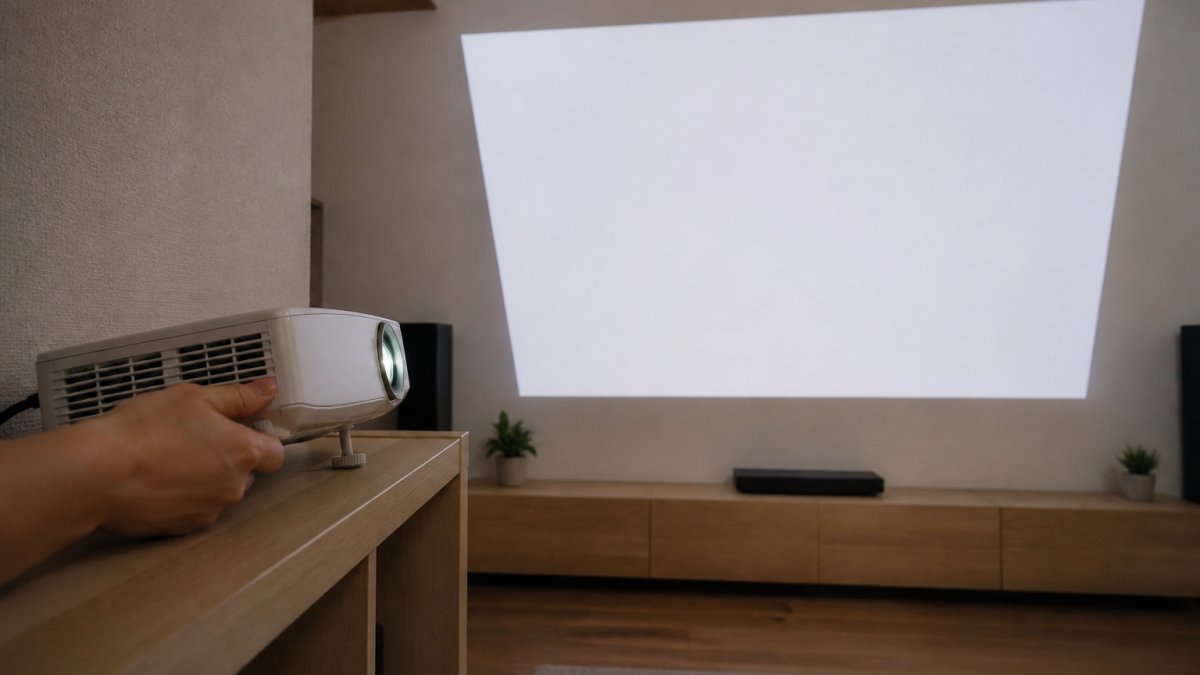
Keystone distortion happens when a projector sits off-axis from the screen.
This guide from JoeMo Promo covers how automatic focus and manual keystone correction differ, what each feature fixes, and which setup suits your room.

The geometry is unforgiving. The Projector Central guide to keystone correction explains that the steeper the projection angle, the more dramatic the trapezoidal image becomes, and the more correction the projector has to apply.
"Fixing" a warped image digitally is not the same as never warping it in the first place.
Automatic Focus vs Manual Focus on Projectors
Autofocus adjusts the lens so the image is sharp. Keystone correction reshapes the image so it looks rectangular. They solve two different problems, and confusing them is the most common mistake we see.
Automatic focus keeps the picture sharp without you touching a dial. A sensor, often time-of-flight, measures the distance to the projection surface, then a motor nudges the lens until corner focus and center sharpness line up.
Manual focus means turning a ring or dial on the lens housing until the image looks crisp.
A projector with automatic focus handles sharpness, but says nothing about whether your image is square. That is keystone's job, and the two features are sold together so often that buyers assume they are the same thing.
How Digital Keystone Correction Works and What It Costs You
Digital keystone correction fixes a trapezoidal image by processing the picture before it hits the lens. The projector scales, stretches, and crops the digital image so the result looks rectangular. It is fast and automatic on most modern units, but it always costs you something.
Here is the trade-off in plain terms:
- Resolution loss: correcting a steep angle means the projector renders fewer pixels in the visible rectangle. A native 1080p image may display closer to 720p worth of detail after heavy correction.
- Image stretching: the processor warps pixels unevenly, which softens fine text and diagonal lines.
- Cropping: some correction modes trim the edges of the frame to hide the warped border, so you lose part of the picture.
- Brightness variation: stretched areas can look dimmer than the rest of the screen.
The steeper your projection angle, the more processing is required and the more visible the penalty. A projector aimed nearly straight at the screen needs almost no correction; one angled 30 degrees upward needs a lot.
Projector Keystone Correction Image Quality: What Actually Happens
Image quality after keystone correction depends almost entirely on how much correction you asked for. Small angles are nearly invisible. Large angles are not.
The damage shows up in three places: corner focus softens first, because the lens was designed to project a rectangle, not a trapezoid; text and fine detail blur next, since stretched pixels carry less information; and screen edges suffer most, where correction is heaviest.
Brightness and resolution matter here too. This is why the Consumer Technology Association display standards overview treats resolution and brightness as the baseline specs that determine how much digital correction a projector can absorb.
The practical rule: correct the angle physically first, digitally second. Every degree you remove from the projection angle is a degree of image processing you never have to apply.
Projector Keystone Correction vs Lens Shift: Which Fixes Your Image?
Lens shift moves the lens optically, so the image lands square without digital processing. It is the cleanest fix available, and the one most buyers overlook.
Here is how the three options compare:
| Method | How It Works | Image Quality Cost | Best For |
|---|---|---|---|
| Lens shift | Moves the lens element physically | None | Permanent installations, ceiling mounts |
| Digital keystone | Warps the image in processing | Resolution loss, softness | Portable use, awkward angles |
| Manual keystone | You adjust corners by hand | Same as digital | Fixed setups, tight budgets |
Optical lens shift is the professional answer; digital keystone is the convenient one. Manual keystone sits in the middle: it does the same digital work as automatic correction, but you dial it in yourself every time the projector moves.
For a permanently mounted media room projector, lens shift plus straight-on placement beats any amount of digital correction. For a projector you carry between rooms, automatic keystone correction is the only realistic option.
Automatic vs Manual Keystone Correction: A Direct Comparison
Automatic keystone correction uses onboard sensors, typically an accelerometer, a gyroscope, and sometimes a time-of-flight or camera-based sensor, to detect the projector's tilt and rotation relative to the surface.
Nova 300 Smart Home Theater Projector →
The difference is not just speed. It is who owns the judgment call.
| Dimension | Automatic Keystone | Manual Keystone |
|---|---|---|
| Detection method | Accelerometer, gyroscope, camera or ToF sensor | Human eye, menu or remote arrows |
| Time to correct | 1-3 seconds after movement | 30 seconds to several minutes per adjustment |
| Re-correction after moving | Automatic on most units | Full manual redo every time |
| Accuracy ceiling | Consistent but sensor-limited | As good as your eye and patience |
| Common failure mode | Over-correction, slight rotation, undersized image | Persistent tilt, uneven corners, forgotten settings |
| Manual override | Usually available to nudge the result | Not applicable |
| Best fit | Portable, frequently moved, off-axis setups | Fixed ceiling mounts that never move |
Where automatic wins. Any projector that moves, a shelf unit, a backyard setup, a rental apartment, benefits from automatic correction because the geometry changes every time you set it down.
Where manual wins. A ceiling-mounted projector in a dedicated room is set once and left alone. Manual keystone costs nothing extra, adds no sensor hardware that can drift or fail, and gives you full control over the final geometry.
The over-correction caveat. Automatic systems are not infallible. A sensor that misreads the surface angle, common on textured walls, dark paint, or strong patterns, may produce a slightly rotated or undersized image.
A note on manual keystone's hidden cost. Manual correction is not free just because it lacks sensors. Every time the projector moves, even a few inches, you redo the adjustment. Over a year of weekly backyard movie nights, that adds up to hours of fiddling automatic correction would have absorbed silently. The trade-off is not "free vs paid"; it is "time now vs time later."
Choosing by Room and Use Case: Which Setup Fits Your Space
The right combination depends on two variables: whether your projector moves, and how steep your projection angle is. Everything else, resolution, brightness, throw ratio, is secondary. Here is how the major setups break down.
Dedicated media room, ceiling mounted. This is the only scenario where manual keystone and optical lens shift clearly beat automatic correction.
Living room, shelf or coffee table. The projector sits off-axis by necessity, usually below the screen and angled upward. This is where automatic focus and automatic keystone earn their keep.
Backyard or portable use. You are projecting onto a sheet, a fence, or a garage door at whatever angle the space allows. Automatic everything is the only realistic answer; manual correction is a losing battle because the surface, distance, and angle all change between setups.

Apartment with limited depth. A tight room forces a steep angle, so correction matters more, not less.
Classroom or conference room. These spaces combine a fixed mount with frequent input changes and occasional bumping. Automatic keystone handles the bumps; manual keystone handles the initial setup.
Troubleshooting inaccurate automatic adjustment. If autofocus or auto keystone keeps missing, check these in order:
- Sensor obstruction. Dust, fingerprints, or a case edge over the sensor window will cause misreads. Wipe the sensor area with a microfiber cloth.
- Projection surface. Patterned wallpaper, dark paint, and screens with visible borders confuse camera-based systems. A plain light surface gives the cleanest reference.
- Ambient light. Strong sunlight or overhead lights can wash out the sensor's view. Dim the room during the initial adjustment.
- Projection angle. Beyond roughly 30 degrees, most automatic systems hit their correction limit and either refuse or produce a visibly degraded image. Reduce the angle physically before forcing digital correction.
- Manual override. Most projectors let you nudge the automatic result. Use it for the final trim rather than fighting the sensor.
Conclusion: Match the Feature to Your Setup
Confusing automatic focus with keystone correction costs buyers real money. They are separate systems solving separate problems, and a projector that nails one can still fail at the other.
Get the geometry right first: place the projector as close to straight-on as your room allows, then let automatic correction handle the rest. For a permanent media room, seek out optical lens shift. If your projector travels, automatic focus and keystone correction are non-negotiable.
At JoeMo Promo, we stock projectors built around that second scenario: rotating stands for flexible placement, automatic focus and keystone correction for a perfect picture every time, wireless speaker connectivity, and free shipping on most orders within the Continental U.S.
Shop the collection and turn any wall into your screen.
Frequently Asked Questions
What is the difference between keystone correction and lens shift?
Keystone correction is a digital fix: the projector processes the image to square it up after it's already been projected at an angle. Lens shift is an optical adjustment: you physically move the lens inside the projector to reposition the image without any digital processing. Lens shift preserves full resolution and brightness because nothing is cropped or stretched. Keystone correction is easier to use and works on almost any projector, but it trades away some image quality. If your projector offers both, lens shift is the better first choice.
Does keystone correction reduce projector image quality?
Yes, digital keystone correction reduces image quality. It works by digitally stretching and cropping the image to create a rectangular shape, which means some pixels are discarded and others are stretched to fill the gap. The result is softer edges, reduced brightness, and occasionally visible pixelation along the corrected borders. The more extreme the correction angle, the more noticeable the loss. Optical lens shift avoids this trade-off entirely because it repositions the image without digital processing.
Can a projector autofocus if it is placed at an angle?
Most projectors with autofocus can focus even when placed off-axis, but the accuracy depends on how the system works. Projectors using time-of-flight sensors or camera-based detection measure the distance to the projection surface and adjust the lens accordingly. At steep angles, some autofocus systems struggle because the distance to the top of the screen differs significantly from the bottom. In those cases, manual focus adjustment or repositioning the projector closer to center usually produces a sharper result.
When should you use manual focus or keystone correction?
Use manual focus when you want the sharpest possible image and your projector is already positioned correctly. Autofocus is convenient for portable setups or rooms where the projector gets moved, but manual focus lets you fine-tune corner sharpness that automated systems sometimes miss. Manual keystone correction is useful when you need a specific adjustment angle that the automatic system does not handle well, or when you want to correct only one axis. For permanent installations, set it once and leave it.
Is automatic keystone correction better than manual adjustment?
Automatic keystone correction is faster and easier, especially for portable projectors that get repositioned often. It uses sensors to detect the projection angle and corrects the image in real time. Manual keystone correction gives you more control and can handle unusual setups that confuse automated systems, such as projecting onto an angled ceiling or a surface the sensors misread. For a fixed home theater setup, manual correction set once is just as effective. For a projector you carry between rooms, automatic wins on convenience.






















