

Why Premium Projectors Last Longer: 2026 Guide
Table of Contents
- The Engineering Behind Premium Projector Longevity
- Laser vs Lamp Projector Lifespan: What the Numbers Say
- Average Projector Bulb Life Hours and What They Really Mean
- Thermal Management and Cooling System Quality
- How to Maintain a Home Theater Projector for Maximum Lifespan
- Total Cost of Ownership: Premium vs Budget Projectors
- Frequently Asked Questions
Last Updated: September 12, 2026
The Engineering Behind Premium Projector Longevity
Why do premium projectors last longer? The answer comes down to engineering decisions made before a single unit ships: better light sources, sturdier internal components, and cooling systems designed for years of continuous operation rather than occasional use. This guide from JoeMo Promo breaks down exactly where that extra money goes, and why it translates into more movie nights before a replacement is needed.
Premium projectors are built around three durability pillars: a long-life light source, thermal management that protects sensitive optics, and component tolerances that resist wear. Budget models cut corners on all three. The result is predictable: cheaper units degrade faster, and the gap widens with every year of ownership.
Light Source: The Primary Driver of Lifespan
The light source is the single biggest factor in how long a projector lasts. Three technologies dominate:
- Mercury lamp: Traditional, affordable to replace, but rated for a relatively short service life and dims gradually.
- LED illumination: Solid-state, no bulb replacement, moderate brightness, long rated hours.
- Laser phosphor: Solid-state, high brightness, the longest rated service life of the three.
Solid-state sources win on longevity because there's no filament or arc lamp to burn out. The trade-off is upfront cost.
Internal Component Wear Beyond the Light Source
Most buying guides stop at the bulb. That's a mistake. The DMD chip, color wheel, and optical engine all wear independently of the light source.
The color wheel spins thousands of times per minute, and its bearings are a common failure point in lamp-based units. The DMD chip, which directs light pixel by pixel, is sensitive to heat and dust. In premium projector housing, these parts sit behind better dust filtration and heat dissipation, which is why they outlast the same components in budget builds.
Laser vs Lamp Projector Lifespan: What the Numbers Say
Laser projectors outlast lamp projectors by a wide margin. A mercury lamp typically runs for a few thousand hours before replacement, while laser phosphor sources are rated for tens of thousands of hours (energy.gov). That difference reshapes the entire ownership math.
| Factor | Lamp Projector | Laser Projector |
|---|---|---|
| Rated service life | A few thousand hours | Tens of thousands of hours |
| Bulb replacement | Required, recurring | None |
| Brightness over time | Dims steadily, lumen degradation | Holds brightness far longer |
| Standby power | Higher | Lower, energy efficiency wins |
| Upfront cost | Lower | Higher |
| Total cost of ownership | Higher long-term | Lower long-term |
Pros of lamp: cheap entry price, easy bulb swaps. Cons of lamp: recurring cost, steady dimming, color wheel wear. Pros of laser: no replacements, stable image, longer life. Cons of laser: higher purchase price.
For a media room used nightly, the laser premium usually pays for itself. For occasional use, a lamp unit can still make sense. The deciding factor is duty cycle: how hard you run it.
Average Projector Bulb Life Hours and What They Really Mean
Average projector bulb life hours describe the rated time before a lamp's brightness falls to roughly half its original output (eere.energy.gov). It is a rating, not a guarantee. Real-world life depends heavily on how you use the projector.
Usage Patterns That Affect Rated Life
Rated service life assumes ideal conditions. In practice, several habits shorten it:
- Running in high-brightness mode constantly increases drive intensity and heat.
- Skipping cool-down cycles traps heat around the lamp.
- Blocked vents raise ambient temperature inside the housing.
- Frequent on/off cycling stresses the lamp more than steady use.
A projector used two hours a night on eco mode will comfortably outlast one pushed to maximum brightness for eight-hour stretches. The rating is a ceiling, and your habits decide how close you get to it.
Thermal Management and Cooling System Quality
Heat is the quiet killer of projectors. Every hour of operation converts electrical energy into light and waste heat, and that heat must move away from the lamp or laser diode bank, the DMD chip, and the optical engine before it degrades them. Premium models invest heavily in thermal management: larger heatsinks, higher-quality blower fans, heat pipes, and airflow paths engineered to avoid hot spots rather than just move air.
The mechanism matters more than the marketing. A laser phosphor light source is sensitive to junction temperature, the temperature at the diode itself, not the air around the housing. When junction temperature climbs, laser output drops and the diodes age faster. Lamp-based units face a different problem: the arc lamp envelope runs extremely hot, and the reflector coating and color wheel bearings degrade faster when exhaust air can't clear the lamp housing quickly. In both cases, the cooling system's job is to keep internal temperatures inside a narrow band, and premium designs do that with tighter tolerances.
What Actually Fails When Cooling Is Marginal
- Solder joint fatigue on the power supply board, caused by repeated thermal cycling as the unit heats and cools.
- Color wheel bearing wear in lamp units, accelerated when hot air recirculates inside the housing.
- DMD chip degradation, since the chip sits in the optical path and is sensitive to sustained heat and dust.
- Fan bearing failure, which then causes everything downstream to overheat because airflow drops.
- Capacitor aging in the power supply, where every 10°C rise above rated operating temperature roughly halves expected capacitor life, a well-established electronics rule of thumb (nasa.gov).
Environment-Specific Failure Patterns
The same projector can last very different lengths of time depending on where it lives. A common pattern practitioners report:
- Dedicated home theater, climate-controlled: Longest service life. Stable temperature, low dust, moderate duty cycle.
- Living room or office with daily use: Moderate life. More on/off cycling, more dust, more ambient heat from other electronics.
- Outdoor or garage setups: Shortest life. Humidity, temperature swings, and airborne dust all attack the optical path and electronics simultaneously.
- Ceiling-mounted near HVAC vents: Often overlooked, but blowing conditioned air directly onto a projector creates rapid thermal cycling that stresses solder joints and lamp envelopes.
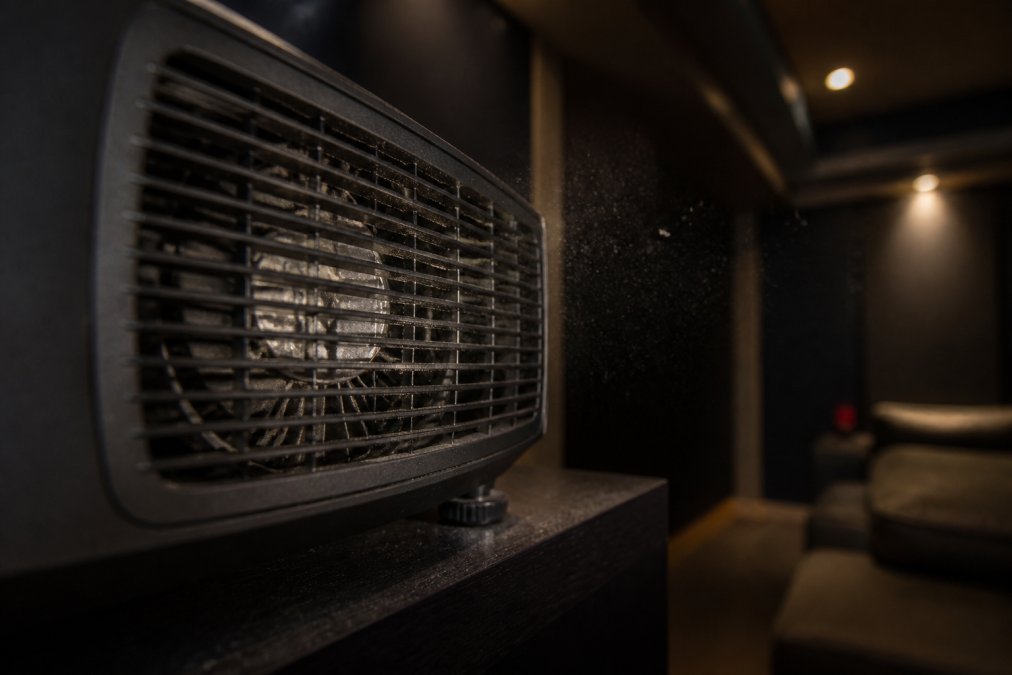
Airflow obstruction is the most common cause of premature failure. A projector pushed against a wall or sitting on carpet sucks in dust and recirculates hot air. That single mistake can cut a unit's life dramatically, regardless of price. Premium units often include temperature sensors and automatic shutdown or brightness reduction when internal temps climb, a feature budget models frequently omit, which means a budget unit keeps running hot until something fails.

How to Maintain a Home Theater Projector for Maximum Lifespan
Learning how to maintain a home theater projector is the cheapest longevity upgrade you can make. Most of the work is simple and takes minutes, but the right routine depends on your environment, not just a generic checklist. Competitors stop at 'clean the filter.' The bigger opportunity is treating maintenance as two tracks: physical care of the hardware, and software-side care that most owners ignore entirely.
Physical Maintenance by Environment
Climate-controlled home theater:
- Clean or replace the dust filter every three to six months, or when the filter visibly darkens.
- Vacuum the vents gently with a soft brush attachment every few months.
- Let the projector cool fully before moving or storing it, at least the full cool-down cycle, not just until the fan stops.
- Run eco mode when full brightness isn't needed; lower drive intensity means lower junction temperature and slower wear.
- Schedule a professional internal cleaning every two to three years for heavy use.
Dusty, humid, or outdoor-adjacent rooms:
- Inspect the filter monthly and replace it more often than the manufacturer's default interval.
- Consider a sealed optical engine if you're buying new, it's the single biggest defense against dust ingress.
- Run the projector for 20-30 minutes after any humid spell to drive moisture out of the housing before storage.
- Avoid sudden temperature changes, moving a cold projector into a warm, humid room can cause condensation on optics.
The Software-Side Longevity Track Most Owners Miss
Firmware and calibration settings aren't just about image quality, they directly affect how hard the hardware works.
- Firmware updates often include revised fan curves, thermal thresholds, and power management. A projector running old firmware may be running its fan and lamp harder than necessary. Check the manufacturer's support page periodically rather than assuming the unit shipped with optimal settings.
- Color calibration matters more than most owners realize. Pushing the projector into an oversaturated, high-brightness 'vivid' mode raises drive current and heat output. A properly calibrated picture at a lower brightness setting can look better and extend component life.
- Lamp power modes (eco, normal, high) are the single biggest software-side lever on lamp and laser life. Defaulting to eco and only switching to high when ambient light demands it is the highest-return habit you can build.
- Auto-off and sleep timers prevent the projector from running unattended for hours, which is a common cause of accelerated wear in offices and classrooms.
Signs It's Time for Service, Not Just Cleaning
- Color fringing or a rainbow effect that wasn't there before, often a color wheel or DMD issue.
- A whining or grinding fan, bearing wear that will cascade into overheating.
- Flickering or dimming that doesn't match the lamp's rated hours, could be power supply or ballast degradation.
- Frequent thermal shutdowns, the cooling system is no longer keeping up, and continued use risks permanent damage.
A preventative maintenance routine costs almost nothing and can add years of service. Ignoring it is how a good projector dies young, and the software side is where most owners leave the easiest wins on the table.
Total Cost of Ownership: Premium vs Budget Projectors
Total cost of ownership is where premium projectors separate themselves from budget models. The sticker price is only the beginning. Add up replacement bulbs, energy use, repairs, and the years of service you actually get.
A budget lamp projector looks cheap on day one. Over five years, recurring bulb replacements, higher standby power, and earlier failure push the real cost well past a premium unit. A laser projector with a long rated service life and no bulb swaps often costs less per year of use, even at a higher upfront price.
This is the case for premium: you're not paying for a logo, you're paying for MTBF (Mean Time Between Failures), better cooling, and a light source that doesn't quit. For a dedicated media room, that math favors spending more once.
At JoeMo Promo, our handpicked projectors are chosen for exactly this reason: build quality that holds up night after night. The Nova 300 Smart Home Theater Projector pairs native 1080p with a 360° stand and auto-focus, while the CAIWEI Halo 300 brings 10,000 lumens for rooms with ambient light.

Frequently Asked Questions
Which type of projector has the longest lifespan?
Laser projectors typically have the longest lifespan, with rated life often exceeding 20,000 hours. LED projectors follow with around 20,000 hours, while traditional lamp-based projectors average 2,000 to 5,000 hours. Premium projectors use solid-state lighting like laser phosphor, which reduces wear and maintains brightness longer than mercury lamps. For example, the CAIWEI Halo 300 uses LED illumination, offering extended life for home theater use.
What is the average lifespan of a projector?
Average projector lifespan varies by light source: lamp projectors last 2,000-5,000 hours, LED around 20,000 hours, and laser up to 30,000 hours. However, internal components like the DMD chip and color wheel can also affect longevity. Premium projectors often have better thermal management and dust filtration, extending overall life. Regular maintenance, such as cleaning filters, can help you reach these averages.
Does laser light source technology increase projector longevity?
Yes, laser light sources significantly increase projector longevity. Unlike mercury lamps that degrade quickly, laser phosphor technology maintains brightness and color accuracy for up to 30,000 hours. This reduces the need for bulb replacements and lowers total cost of ownership. Premium projectors with laser light sources also have fewer moving parts, lessening component fatigue. For home theaters, this means years of reliable performance without frequent maintenance.
How does cooling system quality affect projector durability?
A high-quality cooling system is critical for projector durability. Poor heat dissipation leads to overheating, which degrades the optical engine and reduces light source life. Premium projectors use advanced thermal management with efficient fans and airflow design to keep internal temperatures stable. Dust filtration also prevents airflow obstruction. In practice, models with robust cooling last longer and maintain image uniformity. Regular cleaning of vents and filters supports the cooling system.
A projector that dies after a year is never a bargain, no matter what you paid. The fix is choosing equipment built to last and maintaining it properly. JoeMo Promo makes that simple with handpicked projectors, automatic focus and keystone correction, wireless speaker connectivity, and a 30-day return policy, so you can build a home cinema that holds up for years. Shop the collection and turn any room into a private theater.






















