

Best Affordable 300-Inch Projectors for Home Cinema
Table of Contents
- Why 300-Inch Projection Changes Your Movie Night
- Nova 300 Smart Home Theater Projector: Auto-Focus Precision at $529.99
- CAIWEI Halo 300 Ultra-Bright Projector: Brightness for Large Screens at $559.99
- Karnstar Outdoor Cinema Projector: 18,000 Lumens for Backyard Viewing at $499.99
- Wanderlight Portable Smart Projector: Flexibility Meets Affordability at $509.99
- Keystone Correction vs. Lens Shift: Understanding the Difference
- Using a Projector Throw Distance Calculator for Your Space
- Which Projector Fits Your Room and Budget
- Frequently Asked Questions
Last Updated: October 8, 2026
Why 300-Inch Projection Changes Your Movie Night
A 300-inch projected image transforms how you experience film, sports, and gaming at home. At JoeMo Promo, an affordable 300-inch projector with proper auto-focus and keystone correction delivers a theater-quality experience without the theater's price tag.
Many assume a 300-inch image requires a dedicated media room, professional installation, or a five-figure budget. With the right projector, one that handles automatic keystone correction and autofocus, you can set up a stunning display in almost any room, from a modest living room to a backyard patio.
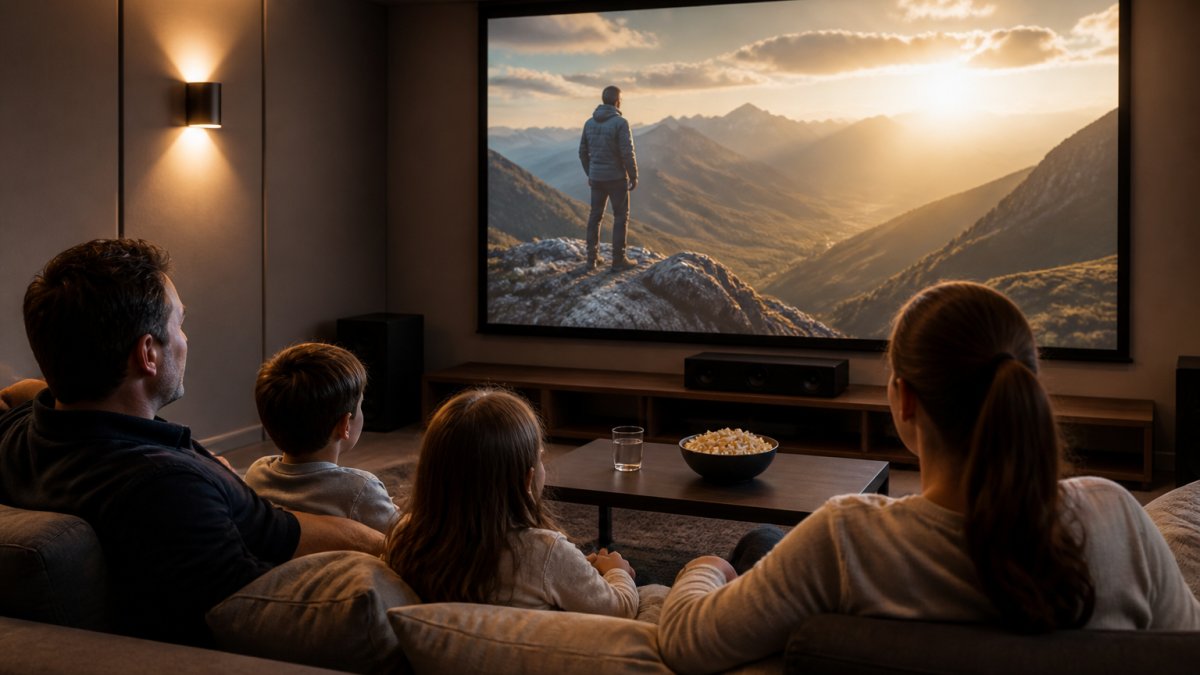
What makes 300 inches work is understanding throw distance and image geometry. A 300-inch image (about 25 feet wide) needs a throw distance of roughly 37 to 62 feet. For smaller rooms, automatic keystone correction becomes essential, adjusting image geometry to compensate for angled projection so you don't need perfect perpendicular placement.
The real advantage of an affordable 300-inch projector is that it removes setup friction. Manual focus and keystone correction demand patience and precision; automatic versions handle both in seconds. You point, it adjusts, you watch.
Nova 300 Smart Home Theater Projector: Auto-Focus Precision at $529.99
The Nova 300 Smart Home Theater Projector is our top pick for an immersive home cinema experience without overspending. At $529.99, it delivers native 1080p resolution with 4K support, automatic focus and keystone correction, and a 360-degree rotating stand that lets you aim it at walls, ceilings, or bedsheets with equal ease.

What sets this model apart is how its auto-focus and keystone correction work together. Auto-focus uses distance detection to lock in sharpness, while automatic keystone correction adjusts image geometry so the picture fills your screen evenly even if the projector isn't perfectly centered. Setup takes seconds: turn it on, it detects its environment, and you're watching within a minute.
What Makes Auto-Focus and Keystone Correction Work Together
Auto-focus and automatic keystone correction are distinct features that complement each other. Auto-focus adjusts the lens for sharpness across the full projection area. Automatic keystone correction adjusts image shape and alignment to correct for projection angle, preventing the trapezoidal distortion that happens when a projector sits below or above center relative to your screen.
Focus is about clarity; keystone is about geometry. The Nova 300 handles both simultaneously using digital processing to stretch and align the image in real time.
Built-in WiFi and Bluetooth mean you're streaming directly from your phone or pairing wireless speakers without extra boxes. The 360-degree stand is genuinely useful, rotate it to project on walls, ceilings, or even outdoors. For most home setups, this projector handles a 300-inch image comfortably when throw distance allows.
Best for: Homeowners with living rooms 15-25 feet deep who want automatic adjustment without manual fiddling.
CAIWEI Halo 300 Ultra-Bright Projector: Brightness for Large Screens at $559.99
Brightness matters. The CAIWEI Halo 300 delivers 10,000 lumens, so it holds image quality even in rooms with ambient light.

At $559.99, the Halo 300 includes native 1080p resolution with 4K support, a built-in Android system, and 5G WiFi. The Android system means Netflix, gaming apps, and streaming services run directly on the projector, and 5G WiFi keeps streaming smooth, which matters when every stutter is visible on a 300-inch image.
For large screen projection, higher lumens mean richer colors and sharper contrast, particularly in the corners and edges of a 300-inch display.
The tradeoff is size and weight: brighter projectors tend to be bulkier. If portability matters more than brightness, this isn't your pick.
Best for: Rooms with some natural light or homeowners who watch during daytime and evening without blackout curtains.
Karnstar Outdoor Cinema Projector: 18,000 Lumens for Backyard Viewing at $499.99
The Karnstar Outdoor Cinema Projector is purpose-built for backyard movie nights. At 18,000 lumens, it's the brightest option here, engineered to cut through evening light and outdoor ambient brightness. The included 200-inch screen means you're not hunting for a blank wall or improvising with bedsheets.

At $499.99, this is the most affordable model in the lineup. Evening light, patio lamps, and residual daylight fade into the background with 18,000 lumens pushing through them, and the image stays vibrant even as dusk turns to twilight.
Compatibility spans phones, HDMI, USB, Fire Stick, and PS5, so you're not locked into any ecosystem. Bring whatever you're already watching. The native 1080p resolution with 4K support is standard across this range, so image detail isn't a compromise.
The catch: that brightness level can feel oversaturated in a dark room. This projector is optimized for outdoor viewing; if you want one projector for both indoor and outdoor use, the Nova 300 or Halo 300 are more versatile.
Best for: Families planning regular backyard movie nights and outdoor entertainment during spring and summer months.
Wanderlight Portable Smart Projector: Flexibility Meets Affordability at $509.99
The Wanderlight Portable Smart Projector prioritizes portability without sacrificing core features. At $509.99, it's compact enough to move between rooms, living room one night, backyard the next, while maintaining the image quality needed for a 300-inch display when throw distance allows.
Built-in WiFi and smart TV functionality mean minimal setup: you're streaming Netflix or gaming within a minute, no external devices required. The compact form factor suits renters, apartment dwellers, or anyone who doesn't want a projector permanently mounted in one room.
Unlike the larger, heavier Halo 300 or the outdoor-focused Karnstar, the Wanderlight travels: dorm rooms, vacation rentals, camping trips. Image quality holds up for 300-inch projection in low-light environments.
Nova 300 Smart Home Theater Projector →
The tradeoff is brightness: in a room with significant ambient light, the Wanderlight will struggle. It's optimized for controlled, darker environments.
Best for: Renters, travelers, and anyone who values flexibility and ease of setup over maximum brightness.
Keystone Correction vs. Lens Shift: Understanding the Difference
Keystone correction and lens shift solve related problems but work differently.
Keystone correction uses digital image processing to adjust the shape of the projected image. When a projector sits below or above its screen's center, the image appears trapezoidal. Automatic keystone correction detects this angle and stretches the image digitally to restore a rectangular shape, fast and with no manual adjustment.
Lens shift is an optical adjustment built into the lens mechanism. Instead of digitally warping the image, it physically moves the lens elements to change where light projects, preserving full resolution and image quality. The disadvantage is cost.
For a 300-inch projector, automatic keystone correction is the practical choice. All four models here use digital keystone correction.
Automatic keystone correction dramatically improves your viewing experience compared to manual adjustment or no correction at all.
Using a Projector Throw Distance Calculator for Your Space
Throw distance is a variable in projector selection. Get it wrong, and you'll either be sitting too close to a blurry image or unable to fill your wall with a 300-inch display.
The formula is simple: Screen width × Throw ratio = Throw distance. A 300-inch image is approximately 25 feet wide, so you need 37 to 62 feet of distance from projector to wall.
For smaller rooms, automatic keystone correction becomes essential. If your room is only 20 feet deep, a throw ratio of 2.0 won't work. Instead, position the projector closer and let automatic keystone correction adjust the image geometry to fill your screen.
The most reliable approach is measuring your actual room: measure from where the projector will sit to the screen or wall for your available throw distance, then divide by your projector's throw ratio to find the screen size you can achieve. If the math doesn't work for 300 inches, move the projector further back, choose a shorter throw ratio, or accept a smaller image.
| Throw Distance | Throw Ratio 1.5 | Throw Ratio 2.0 | Throw Ratio 2.5 |
|---|---|---|---|
| 40 feet | 267" image | 200" image | 160" image |
| 50 feet | 333" image | 250" image | 200" image |
| 60 feet | 400" image | 300" image | 240" image |
For a 300-inch image, you need approximately 60 feet of throw distance with a 2.0 throw ratio. In a smaller room, automatic keystone correction can help.
Which Projector Fits Your Room and Budget
Choosing between these four comes down to room size, ambient light, and whether you prioritize portability.
For dedicated home theaters with controlled lighting: The Nova 300 Smart Home Theater Projector is the best value. At $529.99, it delivers automatic focus and keystone correction without brightness that would oversaturate a dark room, and setup is genuinely effortless. This is our recommendation for most homeowners with a dedicated media room or living room where you can manage lighting.
For rooms with windows or daytime viewing: The CAIWEI Halo 300 Ultra-Bright Projector justifies its $559.99 price through brightness. If you watch during the day or refuse blackout curtains, the 10,000 lumens keep the image vibrant and clear, and the built-in Android system means fewer cables and external devices. This is the pick for families who want flexibility without compromising image quality.
For outdoor and backyard entertainment: The Karnstar Outdoor Cinema Projector at $499.99 is purpose-built and unbeatable for its use case. The 18,000 lumens cut through evening light, and the included 200-inch screen means you're ready immediately. If backyard movie nights are your primary use, this saves money and delivers exactly what you need, though it's less versatile indoors.
For renters and those who value portability: The Wanderlight Portable Smart Projector at $509.99 prioritizes flexibility. It moves between rooms, travels with you, and requires minimal setup. If you're in an apartment or want a projector that adapts to different spaces, the portability advantage justifies the choice. Brightness is the tradeoff, this works best in controlled lighting environments.
| Model | Price | Best For | Key Strength | Limitation |
|---|---|---|---|---|
| Nova 300 | $529.99 | Dedicated home theaters | Auto-focus and keystone together | Moderate brightness |
| CAIWEI Halo 300 | $559.99 | Rooms with ambient light | 10,000 lumens brightness | Larger footprint |
| Karnstar Outdoor | $499.99 | Backyard viewing | 18,000 lumens + included screen | Less versatile indoors |
| Wanderlight Portable | $509.99 | Renters and flexibility | Compact and portable | Lower brightness |
Creating your dream home cinema doesn't require professionals or thousands in installation. At JoeMo Promo, we've designed our projector selection around one principle: effortless setup with stunning results. Every projector here features automatic focus and keystone correction, wireless connectivity, and the ability to project a 300-inch image.
Frequently Asked Questions
What does auto keystone correction mean on a projector?
Auto keystone correction automatically adjusts the image shape when your projector is angled toward the screen instead of aimed straight at it. This prevents the trapezoidal distortion that occurs with off-axis projection. The projector uses sensors to detect the angle and digitally stretches the image to fit your screen perfectly, so you don't have to manually adjust settings. Projectors with this feature, like the Nova 300 Smart Home Theater Projector, lock in a sharp, aligned picture within seconds of startup.
Can an affordable projector produce a clear 300-inch image?
Yes, affordable projectors can deliver a sharp 300-inch image if brightness and native resolution match your room's ambient light and viewing distance. Native 1080p projectors like the Nova 300 ($529.99) and CAIWEI Halo 300 ($559.99) produce crisp detail at this size. Brightness matters more in rooms with windows or daytime viewing; the Karnstar's 18,000 lumens handles ambient light better than lower-lumen models.
What is the difference between keystone correction and lens shift?
Keystone correction is digital: the projector detects angle and stretches the image to correct distortion. Lens shift is optical: the projector's physical lens moves to aim the image straight at the screen without digital manipulation, preserving full image quality and corner focus. Affordable models like those at JoeMo Promo use automatic digital keystone correction, which is fast and effective for most home setups.
How do I know if a projector will work in my small living room?
Use a projector throw distance calculator to match your room depth to the projector's throw ratio. For a 300-inch image, you'll need sufficient distance depending on the projector's lens. If your room is only 12 feet deep, you'll sit very close to the screen. The Nova 300 and Wanderlight Portable are compact options that work in tighter spaces, but measure your actual distance and screen width before purchasing. JoeMo Promo's 30-day return policy lets you test fit in your space risk-free.






















