

7.1 vs 5.1 Surround Sound: Which Upgrade Fits Your Room
Table of Contents
- 5.1 vs 7.1 Surround Sound: Channel Configuration Differences
- 5.1 Surround Sound Speaker Placement and Room Layout
- 7.1 Surround Sound Speaker Placement and the Extra Channels
- Is 7.1 Worth It in a Small Room? Room Size and Listening Distance
- 5.1 vs 7.1 for Movies and Gaming: Content and Use Cases
- Comparison Table: 5.1 vs 7.1 at a Glance
- Receiver Compatibility and Upgrade Considerations
- Alternatives to 7.1: Virtual Surround and Other Options
- Frequently Asked Questions
Last Updated: October 12, 2026
5.1 vs 7.1 Surround Sound: Channel Configuration Differences
When you're shopping for a home theater system, the numbers can feel confusing. What does 5.1 actually mean compared to 7.1? Understanding 7.1 vs 5.1 surround sound comes down to how many speakers deliver sound and where they're positioned in your room.

The first number represents front channels (left, center, right). The second number after the decimal represents subwoofers. So a 5.1 system has five speakers plus one subwoofer. A 7.1 system has seven speakers plus one subwoofer. That extra pair of speakers in 7.1 means additional surround channels positioned differently than in 5.1, creating a more immersive sound field across your listening area.
What the Numbers Mean
5.1 surround sound uses five distinct channels: front left, center, front right, and two surround speakers (typically placed to the sides). The ".1" is the subwoofer, which handles bass frequencies below 100 Hz. This configuration has been the standard for home theater for decades because it delivers convincing surround effects without overwhelming complexity.
7.1 surround sound adds two rear channels to that same front setup. Instead of just side surrounds, you get side surrounds and rear surrounds. This creates a more complete sound bubble around the listening position, with audio effects able to move smoothly from front to back.
Speaker and Channel Configuration Breakdown
In a 5.1 system, the two surround speakers sit roughly at ear level, 90 degrees to the sides of your seating area. They handle ambient effects, directional cues, and surround panning. The front three speakers (left, center, right) carry dialogue, music, and primary action.
In a 7.1 system, the side surround speakers stay at 90 degrees, but you add two more speakers at 135-150 degrees behind the listening area. This rear pair handles effects that move behind you, creating a more complete surround field. The result feels less like sound coming from specific directions and more like you're sitting inside the sound.
5.1 Surround Sound Speaker Placement and Room Layout
Setting up 5.1 surround sound requires less wall space and fewer cables than 7.1. The two surround speakers mount on the sides of your room, ideally 1-2 feet above ear level when seated.
Distance from your seating position to the surround speakers matters. If they're too close, you'll hear them as distinct sources rather than as ambient effects. If they're too far, they lose impact. A typical distance is 8-12 feet from the main listening position.
The 5.1 configuration works well in rectangular rooms where you can place surrounds on the left and right walls at consistent distances.
7.1 Surround Sound Speaker Placement and the Extra Channels
The 7.1 vs 5.1 surround sound decision often hinges on whether your room can accommodate rear speakers without creating awkward sight lines or requiring excessive cable runs. A true 7.1 setup needs side surrounds at 90 degrees and rear surrounds at 135-150 degrees from center listening position.

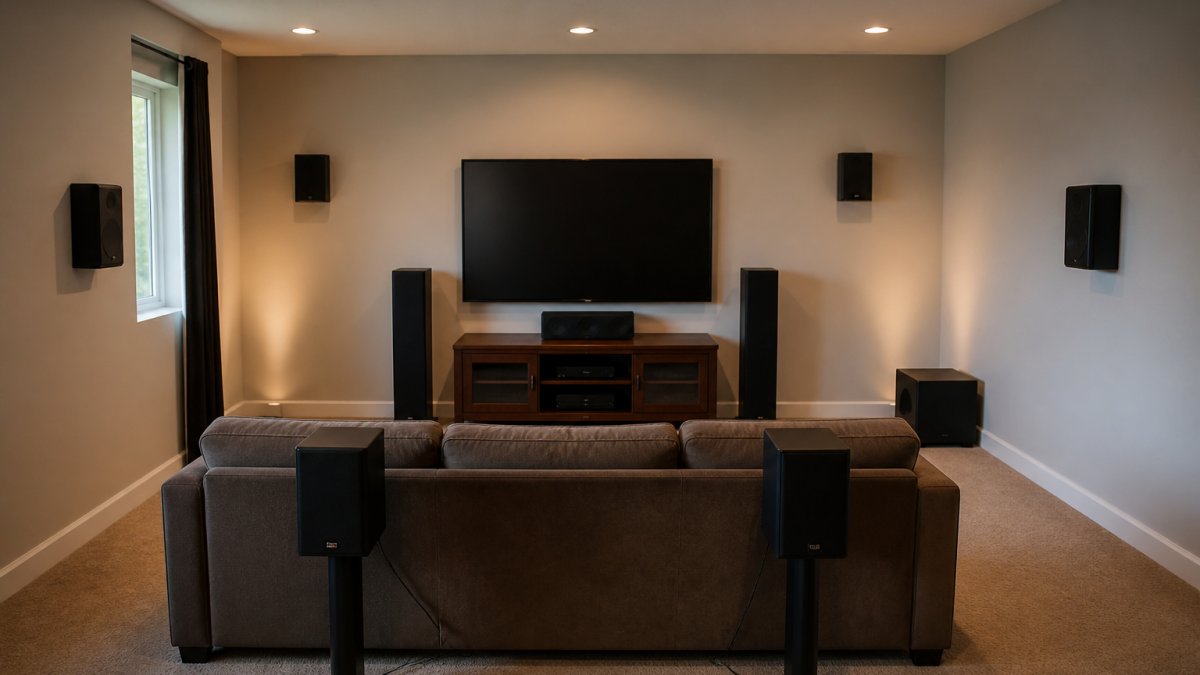
This means in a rectangular room, you're mounting speakers on both side walls and both rear walls. In an L-shaped or open-concept room, rear placement becomes nearly impossible without running cables through living spaces.
Where the Additional 7.1 Speakers Go
Rear surround speakers mount 1-2 feet above ear level, positioned behind the listening area. They should be 10-15 feet from the listening position, farther back than the side surrounds.
The key difference from side surrounds: rear speakers don't need to be as loud. They support ambient effects and create space, not direct action. Many receivers let you adjust rear speaker levels independently, which helps dial in the balance.
Sound Field Width and Immersion
The perceptual difference between 5.1 and 7.1 comes down to how sound moves through your room. In 5.1, surround effects originate from the sides. A helicopter might pan from front to side, but the rear of the room stays relatively quiet.
This immersion matters most for content mixed in true 7.1. When a film or game is designed with discrete rear channels, the surround field feels noticeably wider. However, when 5.1 content is upmixed to 7.1 (a process where the receiver synthesizes rear channels from the existing surround mix), the improvement is subtle and depends on your receiver's upmixing algorithm.
Is 7.1 Worth It in a Small Room? Room Size and Listening Distance
Room dimensions determine whether 7.1 makes practical sense. The spacing required for side and rear surrounds assumes a certain minimum distance from listening position to walls. In compact spaces, this spacing compresses, and the surround effect loses its effectiveness.
Small Room Performance (Under 200 Square Feet)
In rooms under 200 square feet, side surround speakers sit too close to the listening position. At 6-8 feet away, you hear them as distinct sources rather than ambient effects. This breaks the illusion of immersive surround sound. Adding rear speakers in a small room creates even more problems: rear speakers might be only 8-10 feet from seating, making them audible as discrete sources rather than atmospheric support.
For small rooms, 5.1 surround sound delivers better results because the configuration accepts closer speaker placement. The iLive 5.1 Surround Sound System ($519.99) is engineered for rooms where compact speaker placement is necessary, with Bluetooth pairing that eliminates cable clutter in tight spaces.
Medium and Large Room Advantages
Rooms between 250 and 400 square feet benefit from 7.1 configuration. You have enough wall distance to place side surrounds at 10-12 feet and rear surrounds at 12-15 feet, creating proper surround field separation. Rooms larger than 400 square feet see the most dramatic 7.1 advantage because spacing is generous and the surround bubble feels genuinely immersive.
In large rooms, the distance from listening position to rear speakers becomes sufficient that rear effects don't feel like discrete sources. Instead, they blend into the overall soundscape, supporting ambient effects and creating genuine 360-degree audio.
iLive 5.1 Surround Sound System →
5.1 vs 7.1 for Movies and Gaming: Content and Use Cases
Not all content takes advantage of 7.1 surround sound. Movie studios mix films in various formats, and your receiver's ability to handle them determines whether 7.1 actually delivers more immersion than 5.1.
Native 7.1 Content vs Upmixing
Native 7.1 audio tracks exist on some Blu-ray discs, streaming services, and video games. These tracks have distinct information recorded for rear channels.
Most streaming content (Netflix, Disney+, Prime Video) delivers 5.1 surround sound, not 7.1. If your 7.1 receiver upmixes this 5.1 content to 7.1, it's synthesizing rear channel information that wasn't in the original mix. Some receivers do this convincingly; others create artifacts or artificial-sounding effects.
Gaming is where 7.1 shines. Modern games often include native 7.1 or even object-based surround formats. The rear channels carry directional audio cues, footsteps behind you, ambient environmental sound, attack warnings.
Rear-Channel Effects and Surround Localization
Surround localization is your brain's ability to pinpoint where sound originates in three-dimensional space. With rear channels, your receiver can place effects more precisely. A sound effect can move smoothly from front-left to rear-right without feeling like it's jumping between discrete speakers.
In 5.1 systems, surround effects are limited to left-right panning at the sides. Anything that needs to move toward the rear gets synthesized through level changes and phase manipulation, which sounds less natural than discrete rear channels.
For movie watching, the difference is noticeable but not transformative. For gaming, especially competitive shooters or immersive titles like horror games, rear channels significantly enhance spatial awareness.
Comparison Table: 5.1 vs 7.1 at a Glance
| Feature | 5.1 Surround Sound | 7.1 Surround Sound | Winner for Small Rooms |
|---|---|---|---|
| Speaker count | 5 speakers + subwoofer | 7 speakers + subwoofer | 5.1 |
| Wall mounting points | 2 (sides) | 4 (sides + rear) | 5.1 |
| Minimum room size | 150 sq ft | 250+ sq ft | Depends on space |
| Cable runs | Simpler | More complex | 5.1 |
| Native content availability | Most streaming | Select films, games | 5.1 for streaming |
| Immersion level | Good | Enhanced | 7.1 (if space allows) |
| Installation difficulty | Easy | Moderate | 5.1 |
| Best for apartments | Yes | No | 5.1 |
Receiver Compatibility and Upgrade Considerations
Before choosing between 5.1 and 7.1, check whether your AV receiver supports both configurations. Most modern receivers handle both, but some budget models support 5.1 only.
Upgrading from 5.1 to 7.1 means purchasing two additional speakers, running cables to the rear of your room, and potentially recalibrating your receiver's speaker levels and distances. For many homeowners, this upgrade path makes sense only if your room layout changes or you move to a larger space.
The Yamaha YHT-4950U 5.1 Home Theater System ($618.80) includes 400W of output power and a receiver with room to add rear speakers later if your situation changes. This approach lets you start with 5.1 and expand without replacing the entire system.

Alternatives to 7.1: Virtual Surround and Other Options
Not every listening situation requires discrete rear speakers. Some alternatives deliver immersive sound without the complexity of full 7.1 installation.
Virtual surround sound uses DSP (digital signal processing) to simulate rear channels from a 5.1 mix. Dolby Atmos and DTS:X can add height channels without rear speakers, creating overhead effects that enhance immersion.
Soundbar systems with wireless rear speakers offer another path. The iLive Home Theater System with Learning Remote ($509.99) delivers six wired surround speakers with a single remote control, eliminating the need to juggle multiple devices.
For small apartments or rooms where wall-mounting isn't feasible, a high-quality 5.1 system beats a poorly implemented 7.1 setup every time. Focus on speaker placement, calibration, and content selection rather than chasing speaker count.
Choosing between 5.1 vs 7.1 surround sound comes down to your room size, wall layout, and content preferences. Small rooms and apartments typically benefit more from a well-tuned 5.1 system than from cramped 7.1 placement.
Frequently Asked Questions
What's the main difference between 5.1 and 7.1 surround sound?
5.1 surround sound uses five discrete channels: front left, center, front right, and two surround speakers (typically placed to the sides). 7.1 adds two additional rear speakers, creating more precise directional audio and wider sound-field coverage. The '.1' in both refers to the subwoofer handling bass frequencies below 100 Hz.
Is 7.1 worth it in a small room?
In rooms under 200 square feet, 7.1 systems often provide diminishing returns. The rear speakers need sufficient distance from the listening position to create effective surround localization. A well-calibrated 5.1 system typically delivers better immersion in compact spaces, while 7.1 shines in rooms larger than 250 square feet where side and rear speakers can be properly separated.
Does 7.1 sound better than 5.1 for movies and gaming?
For movies with native 7.1 soundtracks (many action films and modern releases), 7.1 creates more immersive rear-channel effects and better audio localization. For gaming, the additional rear speakers enhance spatial awareness in competitive titles. However, most streaming content and older films only include 5.1 audio, so 7.1 receivers upmix the signal rather than play native discrete channels. The audible difference depends on content availability and room size.
How should I place 5.1 surround speakers for the best sound?
Place front left and right speakers at ear level, 30 degrees off-center from the listening position. Position the center channel at ear level or slightly above, directly behind the TV. Side surround speakers should be mounted 90 to 110 degrees from center listening position at ear level or slightly higher. The subwoofer works best in a corner or along a wall. Proper placement ensures balanced audio and accurate dialogue clarity.
Can I upgrade from 5.1 to 7.1 later?
Yes, if your AV receiver has amplifier channels for 7.1 (or if you add a separate amplifier), you can add rear speakers to an existing 5.1 system. Most modern receivers support 7.1 configuration. Check your receiver's specifications for available channels before purchasing. Adding rear speakers typically requires running speaker wire, so plan your installation route during the initial setup if possible.






















